Admin channel or user mute for all users on my server (so they dont have to manually do it themselves)

-

In the servers' settings, you can navigate to Overview and you should see a section called Default Notification Settings. Just set that to Only @Mentions and you will now only get notifications if you are specifically mentioned. This setting applies to all channels in the server.
If that isn't something you are wanting to do, you could also add all the channels under a specific category then have everyone just mute the category!
1 -
Just tried that with a test channel, muted the channel per the instructions provided above and all my users received a notification when I sent a message.
What I'm looking for is to mute a channel within my server on the behalf of all users so they don't have to do it themselves, unless the instructions above are supposed to do that and I found a bug?
1 -
 0
0 -
This only works if their notification settings for that server are set to default. Any modified notification settings will NOT be updated.
Keep in mind, this is located in the Server Settings > Overview > Default Notification Settings, not channel or category settings. Upon completion, assuming their notification settings are set to default, they will no longer get push notifications for messages sent in the server unless they are specifically mentioned, a role is mentioned or @everyone is mentioned!
Tip: Muting mention notifications can only be done by the user. Muting message notifications can be done by the user or server admin0 -

Sent test messages on these channels after adjusting the default server settings for specific channels. My users still received notifications. Likely because they already have their own server-wide notification settings?
Maybe there is a different approach... We have a "news" bot on the server. We want the content in the channels to be posted, but we dont want to spammed with notifications every time. Can I mute the bot for everyone instead? This will eliminate the channel muting approach and the bot can post without annoying everyone, but we can still see the content.
0 -
Oh I see the problem. Those are only for you. The ONLY way to manage notifications for all users is to change the 2 settings I posted a picture of. There is no place to put channels. You can't pick and choose channels, its a server wide setting. Ignore the tab called Notification Settings, those are only for YOU. You are looking for Server Settings.
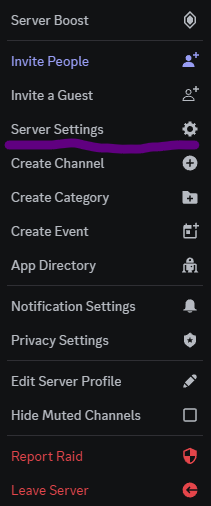 0
0 -
The settings below only apply to you, the user. They are not server wide.
 0
0 -
Here's a tutorial for you!
 0
0 -
Thanks, though that's not the solution to what I am requesting since I can either only modify server-wide notifications, or channel-specific for myself alone.
Hoping for a solution for channel specific notification control, or bot/user specific notification control
0 -
Honestly, Discord will most likely never add channel specific notifications that can be managed by a server administrator as its not something the average server needs. The server wide notifications effect everyone though. If that's not the path that fits you best, you could group everything under a category and just have everyone silence the category, which updates their notification settings for all channels within that category automatically, even new channels created afterwards.
As far as managing notifications from the server side, the only options are the server wide notifications in Server Settings.-1 -
Yes, as an admin on your Discord server, you have the ability to mute a channel or news bot for everyone. To do this, follow these steps:
- Open your Discord server and navigate to the channel you want to mute.
- Click on the open channel's name to access the channel settings.
- In the channel settings, look for the "Mute Channel" or "Notification Settings" option.
- Enable the option to mute the channel for all members. This will prevent notifications from appearing for everyone.
- Alternatively, you can configure specific notification settings for the news bot itself. Right-click on the bot's name in the member list or chat, and you should find options to adjust its notifications or mute it entirely.
By muting the channel or the bot notifications, you can avoid the constant notifications while still having access to the news when you choose to visit the channel. This way, you can set up additional news channels for different topics without each member having to manually mute them.
0 -
Those instructions mute the channel and bot for me exclusively, not for all the users on the server. See screenshots from conversation above where we already covered this.
0 -

Yuricktrevarthenson Not quite too sure on where you got this information, but muting channels like that only works for the user. It does NOT effect the server. Also, there is no such thing as muting a bots notifications. The only way to mute a users notifications, can only be done by the user, is by blocking the person or bot. There is no way to manage a specific users notifications.
Also, ChatGPT doesn't solve everything and doesn't know anything so using it as a reply to a person actually seeking assistance is ridiculous.
kynthia Any idea why these nonsense answers are allowed on here?0
Bitte melden Sie sich an, um einen Kommentar zu hinterlassen.
Kommentare
13 Kommentare