UserProfilesLinks

-

"starting to think discord devs don't know how to do it 😐"
I suspect it is due more to them not seeing this post. It does seem strange though no one in Discord has ever thought that sharing your Discord profile would be useful.
0 -

This is highly needed. I created an app based on Discord users using Discord auth and I would like to get all the feedback through Discord via DM. It would be so nice to be able to just link to Discord profile.
1 -

I'd really like this feature so i can build a community of followers for my github projects.
1 -

yes pls
0 -

bumppp
0 -

Bump! I've wanted to put my Discord Profile into my Linktree (You guys should add linktree integration BTW) and I have to Link to a Server.
1 -

BUMP BRUH
0 -

bump
0 -

up
0 -

Just posting a comment saying I'd love to have this. This would be perfect when writing an article for example and at the end saying "If you need help hit me up on discord!" with a hyperlink in the "discord" word. This, as of now, is not possible.
I cannot understand how such a simple feature has not been implemented yet. Discord is a social app, and you can't send others invites for your profile? What? How is this not a core feature of discord?
Either way, please discord, implement this! :)0 -

bump! im trying to make a contact section and wanted to link my account somehow and came across this, its been 2 years since this was made is there any update?
1 -

Bump again in 2021.
1 -
In 2021 again bump
0 -

Bump.
0 -

Hey, discord. It's time to add this now. Add what the users want.
BUMP1 -

Up!
1 -

Step 1
Open Discord and go to the settings menu on the bottom left corner. It is a cog sign next to the headphones and microphone. Press on it to get to the next step.
Step 2
Scroll down the settings menu and look for “Appearance”. It should be somewhere in the middle. Next, a new submenu will pop up. Here you will go to the “Advanced” section and toggle “Developer Mode”.
Step 3
Now go to the person you want to copy the link from and right-click on their name. Click on the last option “Copy ID”. This option allows you to get the numeric value of that person’s Discord ID.
Step 4
Open the browser and type in the following link “https://discordapp.com/users/xxxx/”. Don’t press enter. Not yet.
Step 5
Remove the Xs at the end of the link and replace them with the ID you just copied.
After pasting the ID, it will automatically turn into a link ⤵
https://discordapp.com/users/xxxx/
replace the Xs with -> Jabir#4919 (my id)
it becomes: https://discordapp.com/users/568696023409754142 (user link) (If you are logged out, it will ask you to log in first and then show the user profile)
-3 -
Jabir, it's not working at all. The result is always the same: my profile :(
1 -
Jabir, I think most of the people knew that already. The thing is though that works only if you share a server with the user the link points to. If you don't, it just redirects to https://discord.com/channels/@me.
1 -
ifrit, looni, well for me it worked. I even copied others' userID and it worked just fine.

It's just that, after you paste the ID and hit enter, it will redirect you to https://discord.com/channels/@me but after fully loading it shows that persons' profile (just like in the ss above).
Just be patient and let the site load with profile, you know, their sites are all dynamic, even if you open the settings, it is still the same URL, and it's the same with profiles...
Let me know if that didn't help, Jabir#4919 contact me, try to use my user link https://discordapp.com/users/568696023409754142/ (If it works, great)
-1 -
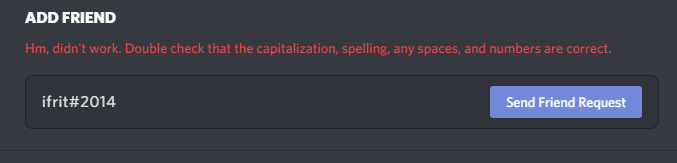
My id is ifrit#2014, could you take a screenshot of my profile?
0 -

A solution that for some reason works on your account but not on mine or anyone else's isn't a good solution.
0 -
Jabir, that solution doesn't work. You must share a server. I can't see your profile...
0 -
Sorry, Jabir, my fault ifrit#2104
0 -

Please consider adding it, would be userful
0 -

+1
0 -

See this is now an issue because Xbox uses the https://discord.com/users/99839741427453952 (in my case) link in user's Microsoft(Xbox) Profile to let you try and message that user. This loads via Edge and while you can login to discord on Xbox it still won't load properly and therefore feels broken either by Discord or Xbox. I'm sure Xbox could instead of providing a link simply provide a text field with the username#discrim of the Discord user but they may then need to utilize API calls to keep that in sync which for the almost 1 Million users of xbox even if only 10% had linked their profiles would still be 100K calls needed. Even if they only updated them twice a day that's 200K calls every 12 hours. I cannot speak for the actual hardware but I know that could put significant load on the Discord servers at some point. I know that most non-corp developers don't get that many calls and I can't imagine why anyone could ostensibly need that many if this endpoint would just always return a user profile. My only question as to why this doesn't work already is: is it an issue with the shards staying sync'd and keeping only their own guilds members in their cache? I imagine so as that would limit the need for extra memory/cache-space in the actual hardware thus allowing to to remain cheap but also performant.
0 -

+1
0

Bitte melden Sie sich an, um einen Kommentar zu hinterlassen.
Kommentare
158 Kommentare