Force color profile to sRGB, etc...

There is a problem, in the Linux client, where the colors are super desaturated.
The solution is a force color profile option to sRGB, HDR and some colorblind-friendly options.
I think this could be useful for debugging and testing too. If you will be able to force color profile, in the developer menu perhaps, people will be able to set the colors displayed to whatever they want, maybe even HDR. Kinda like what you can do in the ://flags menu in browsers.
-

Here to back this up. Please add this feature. I noticed weird and oversaturated colors, and thought it might be my .icc profile. I found out it was different window to window and narrowed it down to Chrome and other Chromium/Electron based applications. Forcing sRGB in ://flags fixed it on Chrome, but the problem persists on Discord. Please add something similar to the ://flags menu, or just an option for that specific setting.
Thanks
1 -
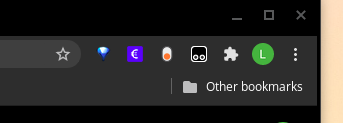
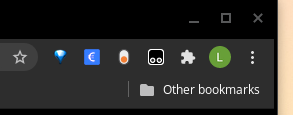
Here is an example of how it looks in Chrome. The purple one is how colors are rendered without sRGB, blue one is how it should be.
1 -
RS787 In the meantime, for if you haven't solved this, I've found a solution. Go to Settings > Appearance > Hardware Acceleration, and disable it. I'd rather have it on, but for now it'll do. I've tested this and it also seems to work with Chrome. So if you'd rather have hardware acceleration on in Chrome, you can enable it again and force sRGB in the flags.
2
Bitte melden Sie sich an, um einen Kommentar zu hinterlassen.
Kommentare
3 Kommentare