Turn off as you type preview features separately

So, I like the feature to preview markdown syntax, emojis and mentions as you type. That's really cool. I really like the feature that pops up a little formatting box when you box-select some text - that's actually a bacon-saver on my current (weird) keyboard setup where I don't have a pipe key, so I can't add partial spoiler tags normally.
However, I hate the new preview box for commands:
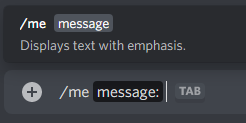
It's very big, kind of distracting, it doesn't provide much help (especially for simple commands like /me), and the worst part - the actual subject of this post:
In order to turn off the feature I don't want, I have to also turn off the two features I do want, because they all use the same switch: 
Basically, it would be nice if these features had different switches.
-

It's real annoying. The box blocks text that I'm trying to reply to and makes it annoying to click around the text in the command. I can't even right click to correct spelling because of it.
0
Please sign in to leave a comment.
Comments
1 comment