Channel Icons

-

well just to remind you, you can also add emojis in front of your channel name, this makes a sort of "icon". -5 -

https://www.copyandpasteemoji.com
place icons in the names of the channels exists but nobody says yes it can be done
-1 -

actually this is now a thing. I don't know how to do it exactly on #annoucements
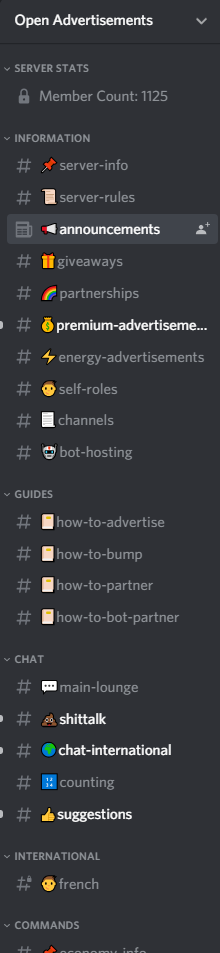
https://gyazo.com/670d90d3a78e87e7fef0a1136c0fb27c6 -
 You can get news channel icons when you buy the developer license ($25).All info can be found here: Discord developer docsThis 📷 is what it looks like when you edit the channel.You can find examples in this server: Chillbar0
 -
but the server isn't even verified!!!
-1 -
You don't need to get verified, you just have to pay the 25 dollars.
1 -

25 dollars for each month or permanent?
0 -
One time
0 -

I use emoticons from here
https://webemoji.org/2 -

Sadly it´s not possible anymore to use emojis in textchannels, voicechannels or categories. This is a really bad change for server owners and many more. I hope they will bring back this feature very soon because there is really no relevant reason for removing this little but important detail of server management!
0 -

Aureumsphere thats is not true.. i just placed emojis in mine and it works.. maybe you are doing something wrong.
0 -

@M-bae
I got the Dev License and I'm not able to put emojis where the # is. I can do #💸channel but I CAN'T do this: 💸channel.
Like @Aureumsphere said, it seems like the feature got removed.
-1 -

And where and how do you do this
0 -

idk
0 -

 So my friend’s server got the icon and i’m kinda confused since he didn’t pay anything1
 -
That is just the rules channel icon. Yea that's free, but this and the announcement icon are the only ones that exist.
0 -

Discord has added if you turn your server into a "Community" server then you don't have to pay the $25 and you can just get announcement channels for free if you turn it.
0 -
Alright, thanks! I’ll make sure to tell him that
0 -

HEY zero code, how do you get the little book icon on your rules channel?
0 -
You need to eneble the community functions on your server and set your rules channel to '#rules'.
Picture in german. Hope you can still find it :)
 2
2 -

@ZeroCode if the rules icon is free then how do I get it?
1 -

@CodeBloodedDiscord it’s automatically changed if you set that channel as the official server rules channel in community server settings
0 -

M-Bay can you tell me how did u do that?
0 -

sam9s it’s mentioned before, read it before you ask 🙄
0 -
Instead of taking pain and time to type this line if you would have pointed towards a solution would have been better .... height of arrogance. 🙄🙄🙄🙄
0 -

sam9s You can copy-paste any icons you want through the mentioned websites by 𝕯𝖊 𝕸𝖊𝖙𝖆𝖑 𝕶𝖆𝖎𝖈𝖊𝖗 and evoq above. Just add those icons to the place where you change the name of a channel or category. I personally use https://emojipedia.org/
0 -
If I want an emoji, then I copy it from here.
https://emojiscopypaste.com/0 -

Ok, let me explain.
• The “Rules” icon:Toggle community for your server and set your server's rules or guidelines channel to the channel which you want it to get the book(rules) badge.
• The “Announcements” icon:
Toggle community for your server. Press create a channel, and choose “Announcement Channel” from the channel type. Or, you can go to one of your channel settings, and turn on “Announcement Channel”. Remember to setup permissions properly after changing it.
• The “Stage” icon, which is a new feature:
Toggle community for your server. Press create a channel, and choose “Stage Channel” from the channel type.
• The “News” channel icon:
Buy the developer license in developer portal. I mean… I know this is too short, but if I type all of the instructions it would be annoying and it is WASTING my time. Search that button yourself.
• The “Store” channel icon:
https://discord.com/developers/docs/game-and-server-management/special-channels
Read this yourself.2 -

All you have to do is press "Windows" + "."
That's Windows and period, when naming a channel. 1
1 -

Guys... come on it's that easy! All you need to do is to enable community in your server settings, AND THAT'S IT, BOOM!
0
Comments
32 comments