Discord on Windows (both browser and the client) do not properly support flag emoji in nicknames, consider using Twemojis to render emojis in names too

Windows 10 supports Emojis, however they seem to have intentionally omitted all the national flag emotes in their list of supported Emojis (I heard it's due to Geopolitical reasons, but there's no official statement from Microsoft). This results in an interesting result, where the emoji renders using the regional symbol indicator instead of the actual flag. You can see this for yourself by going into https://emojipedia.org/flags/ page.

This becomes an issue with Discord as well, since Discord seems to let the OS handle the emoji rendering on all platforms. You can see that instead of the actual flag (European Union flag), the regional indicators are shown instead in nicknames. (Windows 10 Pro Insiders Preview Build 20185, w/ Discord Desktop client, however this also happens with the web interface as well.)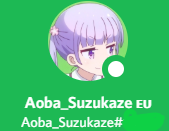
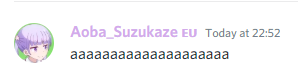
This only happens with names, since Discord uses Twemoji (https://twemoji.twitter.com/) in messages; Flags in messages render normally using Twemojis.
There are people who are proud of their place and they express it by using flags in their name. It always have bothered me that they don't render properly because of this issue. It would be really great if Discord could use Twemojis for rendering names as well. Not only that this solves this OS-specific issue, it also comes with the benefit of consistent rendering of emojis across OS (since different OSes come with different emojis).
-

Yes, this! And not only about the flags!
We are only able to use the very old and incomplete OS emoji version on windows.
Please make the emoji rendering independent from the OS! It would be way cleaner across the different platforms. An overall usage of the Twemoji as the standard Discord emojis would be fantastic and gives the ability to express more unique statuses in the nickname itself.0 -

please figure this shit out jfc
0 -

This problem happens in Windows 11 too
0
Please sign in to leave a comment.
Comments
3 comments