Desktop Discord Issue

Hello,
I was using Discord, and it was working fine, but when I updated, while restarting it gave me a JavaScript error of some sort, and now the Discord app isn't starting (when I open Discord don't show in taskbar or notifications), so I can't take a print.
I don't know if this is useful, but I'm using Windows 7.
Thank you.
-

I just got this issue myself. I didnt get a screenshot of the original error message, but I went and tried to update discord like i usually do, hitting the button. It crashed and popped an error, and wouldnt load. For some reason this update bricked the application to the point of being unable to open. I went and uninstalled it, but when i tried to re-download the executable from the website, i got a error saying zcdLi0YO.exe.part could not be read.
So I went on a goose chase trying to figure out what happened, I made sure java was up to date, and used the windoes cleanup tool to remove unneeded files. None of this worked, but I found a page which went over the installer issues. Following the steps, which was to delete some hidden local files, and going to the siter linked, i got the .exe to be downloaded, and was able to open it.
This is where I recieved a new error, the application ahs loaded and it working, but i had to close out this error about 4 times. Provided is a screenshot of this said error in the hopes someone at discord will look deeper into this. If I can reproduce the issue I had, and get a screenshot of the actual error which i was given, i will gladly update this with it.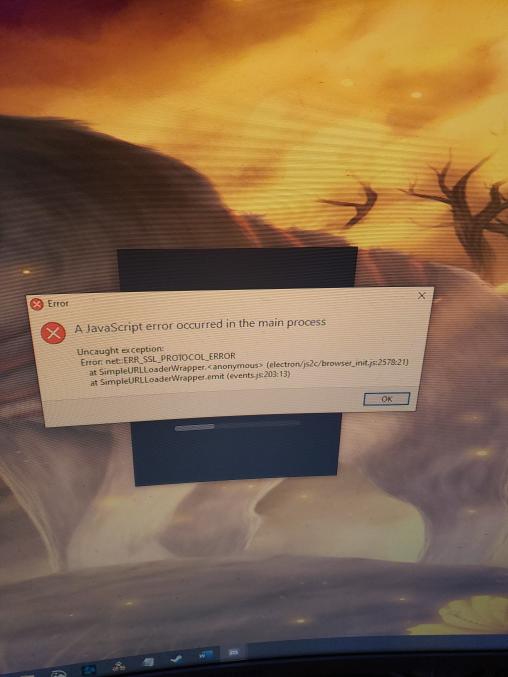 0
0 -
Oddly, I restarted my computer and it worked fine, maybe because it was windows launching it? I don't know, but it seems to be working fine for now.
I hope Discord fix this issue if hasn't yet.
0
Comments
2 comments