New image webp compression makes it impossible to discern details on small images

First gripe I had with it was how it crunched the details on my very small file size pixel art images.
Left: screenshots of compressed discord image
Right: compression disabled via inspect element through the browser version
Notice the complete lack of green in the eyes on the millipede on the far left?
So, I made a fairly simple test to see how it would affect text on small-scale images.
Text starts with a font size of 22 at the top, and decrements by 2 until a size of 4.
On the compressed version, the word “Text” is hardly even legible on the first line on the versions with a background.
It gets progressively more difficult to read in both cases, but even a font size of 8 is fully readable on the uncompressed version; While on the compressed, you could maybe make out the word “test” with a font size of 10.
I understand it's probably about reducing server bandwidth or whatever, but I fail to see how it's worth completely ruining legibility on images that are small enough to not even get scaled down in the first place.
Side note, but it was pretty funny seeing this ironic tooltip pop up while loading the website version of discord to grab these screenshots.
-
This has since been updated, so images now use the “lossless” setting.
It does seem better, though it's not truly lossless despite the misleading naming.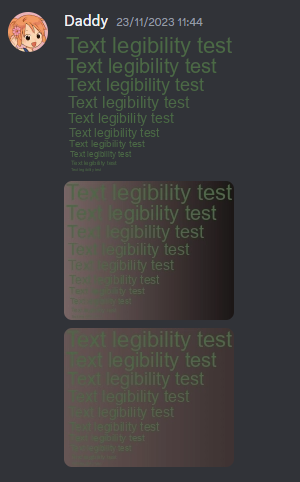 2
2 -
Images are now truly lossless again, at least for all images I've tested
thanks :)0
Iniciar sesión para dejar un comentario.
Comentarios
2 comentarios