Notifications settings not saving

Starting about a week ago discord is no longer saving by notification settings for servers.
It's getting really annoying to change them each time I log in
-

Same thing has been going on for me also.
13 -

I am so glad I am not the only one having this problem. Setting server notifications for "All Messages," does not save, yet if I set it to "None" it saves it, both for Windows AND Android. I will note that I have Discord installed on a few devices. Three laptops, a desktop and my Android phone. I will also mention that this problem is also present in the web version of Discord, when I sign on.
11 -

Yup. The notifications for my own server keep switching to "only @ mentions" at least once a day, and I keep setting it back to all messages. It doesn't seem to be happened for me on other servers. I have only been using the Android version for the last few months.
12 -
It's namely with servers I don't own. One in particular that I like getting all notifications for. I was suggested to re-install Discord, but the problem is also persistent in the web version, so it's not just my THREE LAPTOPS and DESKTOP.
4 -

It's happening with me too. I co-run a server and we set the server default notifications to only mentions to not bug our members but I want to get notifications. I was... until recently. Now I can't permanently set my personal settings to notify on all messages, it reverts whenever I refresh the web app.
EDIT: I tried it on mobile too, same issue if I close the app and reopen.
4 -
Discord is aware that the Android app has a bug where server settings don't save. This might also explain the issue with their desktop and web versions, as I use all of their platforms. Maybe I should try Discord Canary and see if I'm getting the same issue.
4 -

This happens to me too.
I'm trying to change from "Only mentions" to "All messages", but goes back to the "Only mentions"-setting again.
3 -

bump, needs to be fixed
4 -

Another bump. Same thing, keeps switching to "Only Mentions" on both my laptop and desktop. Discord please, this is super annoying.
1 -
All of us, right now
 7
7 -

ive been having this problem for so long, thought it was just me experiencing this. pls fix discord
0 -

Same issue for weeks, why is this not a priority? This is the most basic feature of discord.
0 -

bump, make sure to up-vote OP
0 -
A month into this issue, and it has yet to be resolved. I recently got promoted to a moderator in a server I'm active in, which has the notification setting defaulted to "Only @Mentions," which, to me is not ideal if I'm moderating.
Even with the most recent update, setting "Only @Mentions" to "All Messages" setting does not save. However, there IS a workaround for those of us who want "all messages."
In notification settings, enable "Suppress @everyone and @here" and select "All messages," and the setting, surprisingly saves, even when I've refreshed the Discord desktop client. It's not perfect, but it is a workaround.0 -
Another workaround I just found:
Apply a notification override to "all messages" for all the text channels and this seems to save it0 -

Thank you for the workarounds! Suppressing @everyone and @here seemed to work great.
This issue does not depend on whether or not I own the servers experiencing the issue. It seems to occur across all of them.
0 -
@Zanzlanz: Server settings are set through your Discord profile, and are synched on all of your devices with Discord.
0 -

So no solutions still? Having same problem
2 -

It's not just for messages either, it's for PTT and other settings as well, how do we submit this so it gets fixed?
Ples send help
1 -

Just came across the same thing tonight as I was working on getting Voicemeeter Banana setup for my system. Discord works great when I go in and disable all the things that messes with my setup (ie: echo cancellation, noise suppression) because I have that stuff configured elsewhere at more of a system level.
By the way, I found this thread because the changes I was making under audio in Discord weren't being saved but the crux of how I came here was due to how badly my microphone in Discord sounded (crackling and super compressed sounding). If anyone is running into the same issue because they too are using Voicemeeter (especially with the virtual cables), I disabled the following under Voice & Video settings:
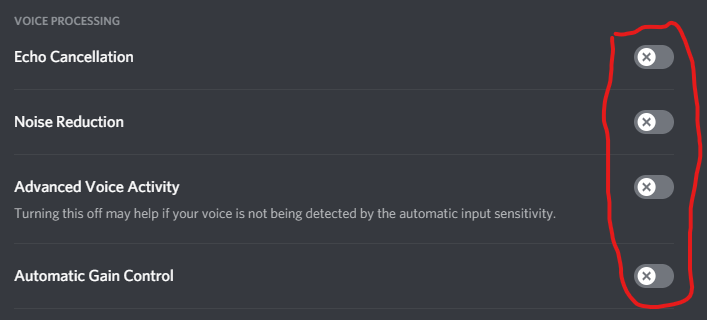
My gaming headset already takes care of background noise suppression in the hardware, my Realtek audio device handles the other "enhancements" (ie: echo cancellation), I don't want automatic gain control because I have my levels in Voicemeeter adjusted for each audio path so one channel won't overpower another (in addition to some minor compression/limiter on my microphone in Voicemeeter).
It all actually started sounding really smooth after disabling those options, but now Discord isn't saving my settings.... I mean honestly how does a company as big as Discord manage to break saving settings for their application out of nowhere lol. Kind of embarrassing if you ask me but actually just goes to show the caliber of engineers in tech nowadays so honestly it's not surprising.
Apparently there's a setting I've never seen before called "Use an experimental method to capture audio from applications." that was enabled by default for me after installing Discord on this new setup. Hey devs, I'm not trying to tell you how to do your job or anything, but perhaps save the experimental stuff to nightly or beta releases. If you don't want to deal with the overhead of multiple release channels, then at least disable it by default for christ sake. Especially when the lions share of the Discord user-base pretty much exclusively uses it only for voice.
I really don't understand the logic behind why you'd do that.... but then again back in 2000 Ford took an already solved problem of manufacturing cars with road-worthy tires, and with the help of Firestone started using tires with subpar design, construction and rubber compound that ended up causing 250 deaths, thousands of accidents and settlements to the tune of over half a billion dollars. But what do I know, maybe it takes having a fancy degree from a preeminent school that is renowned for their master classes on "All Things F**kery" in order to get on that next-level wave where the rest of the Chads live.
Sorry, I digress lol.
I just came here to see if anyone had a fix for this. Actually I did uninstall Discord and removed the directory at C:\Users\<my_username>\AppData\Roaming\Discord so I will be restarting to see if that works. As a side-note coming here was a blessing in disguise, thanks to Mika Laybourn for that meme you posted. Literally made me lol4real irl (saved it as well, it's so good lol).
0 -

Why!!! This is so anoying anyone know how to help?
1
Iniciar sesión para dejar un comentario.
Comentarios
21 comentarios