Quick PTT preview indicator and preset changes.

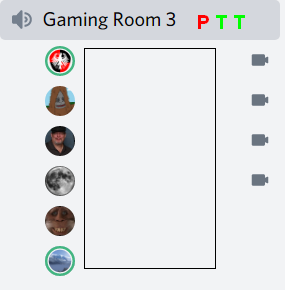
Instead of being buried in the setup menu, have PTT (Push to Talk) indicators and switches next to OR below the current voice channel (VC).
Mousing over the "PTT" would briefly describe each choice below.
The P is just an indicator of channel requirement.
The middle T toggles PTT on and off.
The last T sets the keybind if PTT is required.
Similar to this;
PTT Needed Green/Red ("P" is either G/R)
Green "P" if PTT is required.
BLINKING RED "P" if PTT "IS needed" AND "IS NOT" toggled on.
Solid RED "P" if PTT is not required.
Switch PTT On/Off Green/Red (Middle "T" in PTT toggles On/Off.
Change hotkey keybind Y/N (Last "T" in PTT brings up hotkey bind).
From there the keybind would be input and used after the enter key.
Lastly, there would need to be at least 1 if not 2 spaces between the letters of PTT. Solely to help avoid mis-clicking wrong letter.
Iniciar sesión para dejar un comentario.
Comentarios
0 comentarios