Feature Request - Customizable Audio Channels in Discord

Hello Discord Team,
I hope this message finds you well. I'd like to propose a feature request regarding audio channels on Discord.
Currently, Discord registers two separate audio channels in Windows; however, both channels are utilized in a mixed fashion. It would greatly enhance user experience if we could organize the types of audio used for each channel independently.
Suggested Implementation:
- Channel 1: Reserved exclusively for Voice Chat.
- Channel 2: Dedicated to everything else, including Notifications, Soundboard, Shared Applications, and Desktop sharing.
This proposed feature would prove immensely beneficial for users looking to implement filters or employ proper audio routing through mixers like WaveLink or tools such as VoiceMeeter Banana.
Feature Benefits:
1. Enhanced Customization: Users can tailor their Discord audio experience by assigning specific sources to each channel.
2. Compatibility with Audio Tools: The feature seamlessly integrates with external audio tools like WaveLink and VoiceMeeter Banana.
3. Advanced Audio Settings: Users gain the ability to select the preferred audio channel for each Discord audio source, offering a more personalized and dynamic audio setup.
I envision this being implemented in the advanced audio settings, where users can easily view and manage Discord audio sources. Allowing users to choose which channel a source utilizes (Channel 1 or 2) would empower them to have greater control over their audio experience.
Thank you for considering this feature request. I believe it would be a valuable addition to Discord, enhancing the platform's versatility and user satisfaction.
Best regards,
Alex
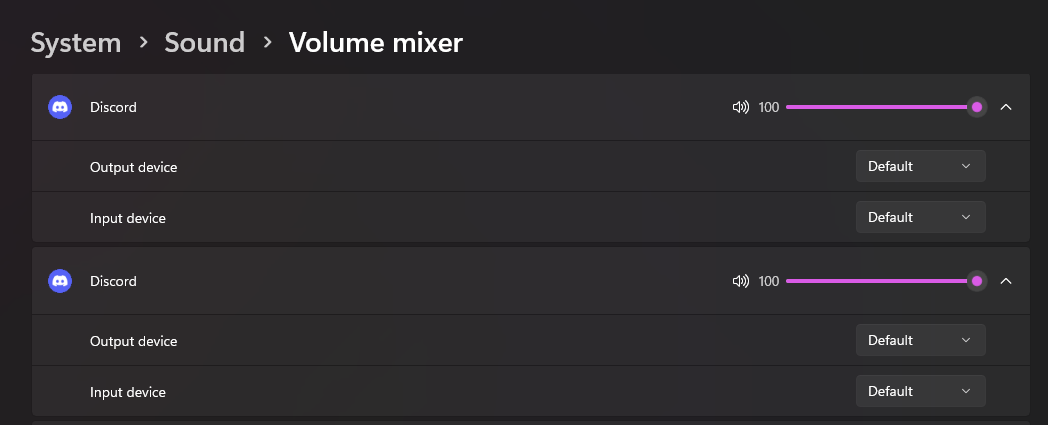
-

I would love this main, because I use NVIDA Broadcast to filter voice chat, but when watching screen shares, it also filters out the game audio for their stream, meaning i either have to watch it muted, or remove the filter.
0
Vous devez vous connecter pour laisser un commentaire.
Commentaires
1 commentaire