Integrate Snap-Camera With Discord

Integrate the new Snap Camera with Discord so we can put on lenses in our faces to make our calls funnier! Twitch just got their extension. So why can't we!
It would look like this! Can you imagine how fun the calls would be?
https://snapcamera.snapchat.com/guides/
-

I don't understand how to make it works I only see this when I try and use it.
 0
0 -

+1 STILL DOESN'T WORK ON MAC. plssss repair it
1 -

+1. Still doesn't work on Mac.
0 -

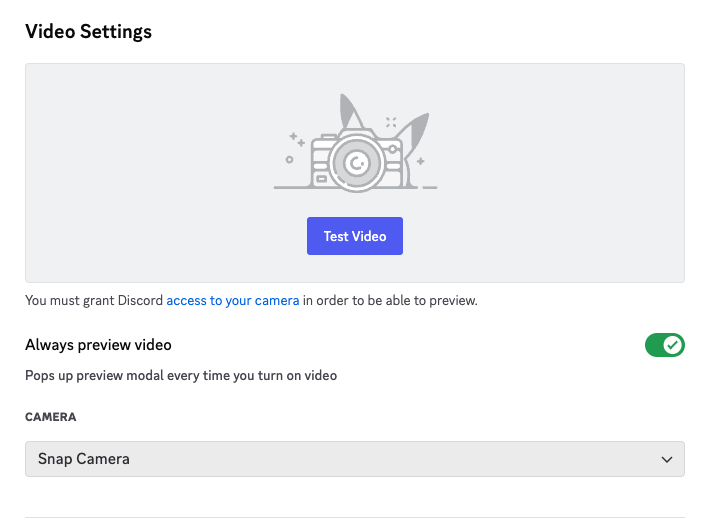
I found a workaround for this problem in order to get the option of choosing Snap Camera when clicking the small arrow at the camera icon. The problem is that the app does not recognize Snap Camera as an input and in order for it to do so we need to remove the code signature from a certain file. Typing the following in the terminal should do the job
sudo codesign --remove-signature "/Applications/Discord.app/Contents/Frameworks/Discord Helper (Renderer).app"
This will prompt for your admin password, and after a relaunch you should have the option of choosing Snap Camera (and any other virtual camera)
1 -

i did what u told me to do, finally theres the snap camera option but when i tried it the screen goes black :(( how can i fix this?
0 -
If the screen only shows black instead of the camera feed, it could be that another app is using your camera. Make sure this isn’t the case.
0 -
I already checked that discord is the only one who uses it, and i relaunch the app and restarting my mac cause maybe there might be a glitch. The snap camera is on and still black screen :(
0 -
Does the snap camera app work single-handedly? If you open only snap camera, does it show your camera feed? If not, the problem is with the snap camera app - perhaps it needs permission to use the camera (go to settings->security & privacy->privacy [tab]), or the settings of the app needs to be changed.
0 -
I can see the camera feed in the snap camera app itself but only in discord where the screen goes black 😔 this is tough lmao
0 -
Hmm… I am not able to recreate your error, but I think I have one more thing you could try. Try removing the signature from these other files as well - just type the following commands:
sudo codesign --remove-signature "/Applications/Discord.app/Contents/Frameworks/Discord Helper (Plugin).app"
sudo codesign --remove-signature "/Applications/Discord.app/Contents/Frameworks/Discord Helper (GPU).app"
sudo codesign --remove-signature "/Applications/Discord.app"
Now relaunch the app, and see if it works
0 -
i put all the commands on terminal and still nothing changed, alot of my friends cant do it on their mac also :(( maybe ill wait till they update. I really appreciate your effort!! Thank you
0 -

+1 still doesn't work on mac
0 -

+1 still doesn't work on mac!!!
0 -

Not sure if anyone is still looking at this, but for those who want it to work on Mac, I verified that it works in the web version using Google Chrome on a Mac on the latest Big Sur (11.6) (but not on the standalone Mac desktop app). JFYI.
0 -

FIX THIS CRAP APP
0 -
Still not working on mac. Why discord is such a lame app?!
1 -
Snap camera doesn't exist anymore.
-1 -
1tzEmerald It is exist. Further versions development was cancelled but latest version is working good with all lenses. I'm using it daily as working remotely and have bunch of calls. Anyway i found workaround on Mac - discord web is supporting snap camera fine. So i'm happy
 0
0
Vous devez vous connecter pour laisser un commentaire.
Commentaires
48 commentaires