Suppress all mentions from all servers in a Folder [Feature Request]

The idea is simple, but would help a lot.
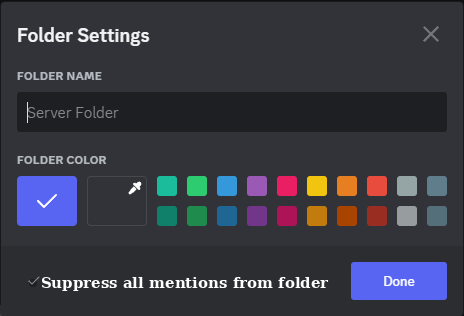
Just adding a checkbox in the Server Folder Settings where if it is checked, any and all mentions inside that folder will be suppressed, NOT showing a number inside a red circle neither in the folder nor in Discord's icon and not showing any notification or sign of a mention on mobile.
The red circle with a number will still show in the server's own icon if you do expand the folder to check, but not anywhere else.
There are several servers I have, and I believe a lot of people have a similar situation, for places or people that constantly use mentions which I want to be aware about, but there are also those that I don't want to be bothered by but still want those mentions to exist if and when I go to check on those servers myself.
For example:
I follow several servers which I got a role to receive updates of new releases of their works, and I want to always see that red circle with a number for any update.
There are also people which I want to immediately be aware that they talked to me.
As for those I don't want to delete or remove the mentions, but still would like to suppress them out of their folder, I follow servers for several streamers. They use mentions to share new content they posted on YouTube but also to share that they are online.
I don't want to be aware of those at all times, but if I check on them myself, I do want to see those mentions warning.
The folder would then change to show a grey circle with an X to inform that any mentions from servers in that folder are being suppressed.
That X would only turn back to being the red circle with the number of mentions if you expand the folder to see the servers inside.
कृपया टिप्पणी करने के लिए साइन इन करें करें.
टिप्पणियां
0 टिप्पणियां