discord beeps without showing where the new activity is

Discord is starting to drive me crazy with all it's unclear beeps.
First off, I have desktop notifications turned off, because there is no way to force them to the second monitor, and I don't want them popping up on top of my primary monitor gaming sessions.
With notifications turned off, it's virtually impossible to tell where the beeps are coming from. My discord had been beeping all this morning without adding any red-numbers to any servers, and I finally got fed up with it and muted all servers.. which is not what I want to do, but I don't have any choice.
So now I have discord with desktop notifications off, and all servers muted.... because the notification system in discord is so broken.
Please
1) Make some notification-history UI page inside the discord app, which will show a history of everything that caused a beep or ding on any server for any reason.. so when it beeps or dings I can go and look in one place and see what the hell caused it, even if it's been a while.
2) Allow me to set desktop notifications to show in ANY corner of ANY monitor, and dismiss after a configurable delay, including NEVER.
-

Chuckles.
But it's not just the app. The desktop/browser does it too!0 -

How about doing something useful for once like fixing a fundamental and easily fixable issue like this rather than wasting time on the cutesy-worded changelogs ("Update: Look how hip and real we are, fam! We talk like y'all!") and "mission critical" projects like "What should the ears of our logo look like?"
0 -

Root cause - notifications enabled for all acitvity and not just @mentions when posting a message to a channel. This should not be default.
Resolution/Workaround - check each server and change it to @mentions
What I did to fix it from the web app interface:
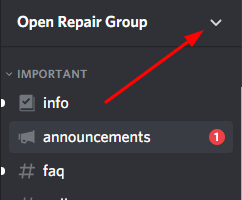
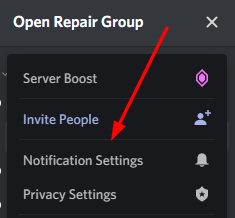
 -3
-3 -
 @wiseleo "check each server and change it to @mentions"
Nope. This is already done and I do it to any/all channels I join. And there seems to be evidence that the notifications come from servers that people have left. Work-arounds (when they work) are nice for a little while, giving the developers time to fix the issue. But that isn't the case here, the developers don't give 2 shits about bugs in their system as indicated by this 2 year old thread.
1 -

wiseleo The issue is not so much the notification 'beep' itself, but the fact that there is no visual indication of what it was for.
That is the issue I'm having.
I'm a member of only a few servers, i hear a beep and there is nothing to match it. No red dot with number.
No popup, i hear a beep, switch to discord and nothing.2 -

oh my god, improve this horrible feature and make Discord STFU!!!
1 -

Yup, issue is not notification itself but the fact that nothing tells you where it is. "Oh discord beeped. Too bad I have no idea what server received the notification or what channel in said server it was in."
1 -

Yet another post to clarify that the issue isn't that discord beeps, it's that it doesn't give a clear indication of *why* it beeped.
White bolded channels don't help. With 20+ servers each with 10-20 channels spanning every timezone there will always be channels with unread messages. But if something goes beep I want to know where it went beep from. I don't even want to see the message just the from where.
Expose a simple event log: server A:Channel X:timestamp:notification type that's all that's needed.
3 -

Still an issue. Notification history list is badly needed.
2 -

Over two years later and you are still forced to mute the entire program to get rid of this annoyance?
do you even code?
1 -
Hi gang! Got any cool summer plans? Any life changes to announce?
0 -
And it is still not fixed, apparently! Since they refuse to fix something so simple, why has this platform become so popular? I only joined relatively recently. With their lack of responsiveness to fixing something so fundamental and so annoying, why am I getting invited to so many peoples' Discords. Seems to me Discord should be losing users, not gaining them? I would rather use another tool.
2 -
@Aardvark9 said "Seems to me Discord should be losing users, not gaining them?"
It's because they have an active marketing campaign to increase their users beyond the gaming community. As such they care more about getting in new blood than taking care care of their loyal existing users. IOW, they already have you, so they don't care about you, or me, or anyone else posting on this thread.
1 -

For anyone following along that missed it early, here is the pain-in-the-butt manual fix:
1. Look at every channel with a white dot to its left. One or more of these are you "problem children"
2. Right-click each one and go to "Notification Settings"
3. The bad ones will have "All Messages". That's the core of this problem.
4. Change each one to "Only @ mentions"
You will no longer get phantom dings.
In all honesty, Discord should have an option to globally set your minimum notification level to "Only @ mentions", which would only change channels set to "All Messages".
1 -
"Look at every channel with a..."
Nope, it's been demonstrated that phantom notifications can (and most often do) come from servers that the user was once a member of and have left.
"The bad ones will have "All Messages". That's the core of this problem."
The core of the problem isn't that notifications are enabled, it is that there is a notification without an indication of the notification origin.
3 -
The core of the problem isn't that notifications are enabled, it is that there is a notification without an indication of the notification origin.
Fair enough. Like, legitimately fair.
Make the white dot a different color, animate the channel responsible bouncing, move the notifying channel to a special top slot in the icon list... there's like 20 different ways, all of which have been established as viable visual indicators for decades, Discord could have used to make this behavior NOT a pain.
1 -
mukiex
4. Change each one to "Only mentions
I've already gone through and done this, it has not fixed the problem.
1 -

Aardvark9
Whip
I agree that Discord is more popular than it deserves to be. It has so many usability problems and makes no effort to correct them. There are better platforms out there but I gotta go where my friends are. Looks like I traded in Facebook for something worse.
1 -
I don't think the industry has done any research on ideal threading for various forums. Facebook, pushing the most recent comments to the top, isn't the answer. Yahoo Groups, IMNSO, had it right. The social media niche is ripe for a smart company to come along and bury these dinosaurs. Amazon got where they are by good customer service. Discord hasn't learned that lesson.
3 -

Its unbelievable this still hasnt been adressed
For the love of god add some way to identify where these goddamn beeps are coming from!!!
1 -

I wonder if you pay for nitro if you get extra random beeps you have no clue where they come from.
If I kill someone over this, I am blaming discord for driving me insane with random beeps.
Why is this still an issue.1 -
Why is this still an issue???
Easy, Discord don't give a toss.
They're too busy trying to trail blaze a path to differentiate themselves from their peers.....
.... only to forget that having a reliable and robust base experience is what we all really want in the end.
If an alternative cloud based communications platform emerged that cared about the user experience more than emotes and fairy dust i'd be all over it in an instant.
2 -

so 2 years later and this is STILL an issue? I've muted all the channels and I still here the stupid alert. "Hide Muted Channels" doesn't even work on the desktop app.
1 -

Ok my guess is, and tell me if it makes sense, that the sound is actually the sound made when new people join the channel. However, there is no visual notification for that.
Go to Settings > Notifications > Sounds and disable User Join.
That sound is very similar to the Message sound so it's hard to tell. I also think muting a channel or making it notify only when you're being mentioned, might not block User Join sound still when you're on that channel, because it's a different type of notification. Do you think I'm right about this? I disabled it for a while and no sound at all.
This problem is about 4 years old. My god.1 -

@VirtualInsanity but in this regard discord is worse than slack. All's you'd need is a LIST of where these notification spam beeps were coming from in order to know which channels to mute. I wound up *LEAVING* every server I was on but 3 -- my own, a current course, and a community that is so extremely active, the admins have thankfully made the default notifications reasonable.
0 -

@TrollAxeThrower Nope doesn't make sence because I don't belong to any servers and I still get it. This is why I have not used my Discord accounts for YEARS and Discord staff does not GAF.
0 -
Icon Will you please try to shut it down anyways? Maybe friends trigger that sound too?
0 -
@TrollAxeThrower Did you read my post? Don't you think I tried everything YEARS ago? And even if that functioned as a work-around, it still does not fix the actual problem that the Discord pukes ignore.
1 -

Why would you still be lurking in a discord support forum for years after supposedly not using your discord accounts. I just changed the server notification settings to only @mentions and it fixed it for me. GG
-1 -
@Mcgillicutty who said I was lurking? I'm subbed to this thread. Ever hear of email notifications? And what if I just came back to join a community, and then realized the issue still persisted and did a search and found this thread? Do you lack imagination and just could not possibly fathom a single reason why I might post here? And so what if I was lurking the discord forums? Why would you care?
1
कृपया टिप्पणी करने के लिए साइन इन करें करें.
टिप्पणियां
202 टिप्पणियां