[Idea] Streamline Slowmode: Introduce Auto-expire Right Click Option

Streamline Slowmode: Introduce Auto-expire Right Click Option
With the introduction of Threads and ability to automatically archive them after a certain period of time (1 hour, 24 hours, etc.), I thought why not bring that same functionality to slowmode?
Upon right-clicking on Desktop or Web (or hold press on Mobile) on a specific channel would you gain a new option: Auto-slowmode. This would automatically start slowmode and correspond with a specific time when they can expire. For this idea, lets say the times are 1 hour, 4 hours, 6 hours, 12 hours, and 'Until disabled manually'.
This would allow server moderators and admins to quickly enable the feature to circumvent a raid or want the chat slowed down for moderators to review it. If they believe the chat will cool down in a couple hours, they could set slowmode to expire in 4 hours, for example.
This is also similar to 'mute channel' which has options to time limit pre-sets (1 hour, 8 hours, etc). You would also have an option to force-end the slowmode, as shown.
The image below shows a mock-up example of the idea: 
Okay so far we have established slowmode with an auto-expire system. What about the duration of the actual cooldown?
This feature would make a significant change within channel settings. As of right now, you have to go into the channel settings to manually set slow-mode. However, this would change to: "Default Slowmode"
"Default Slowmode" would determine the default amount of time for slow-mode and once enabled using the right-click (or hold press) option; every slowmode will be set to that duration. No longer would there be any reason to have to go into the channel settings to set, enable or disable slowmode itself.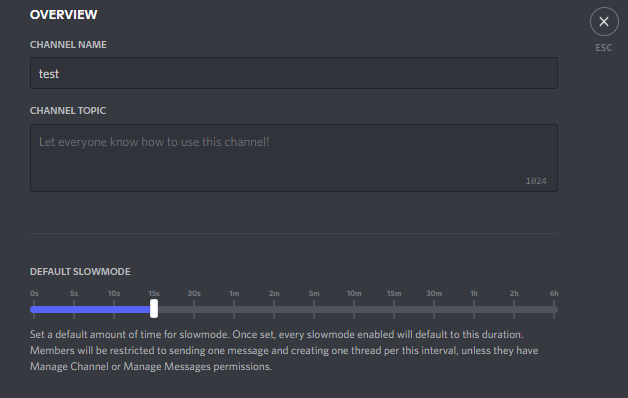
I believe with these changes, slowmode will be streamlined for easier use. Ideally, in addition to the new features mentioned above, a new server role permission should be added: Manage Slowmode. This permission would allow you to enable slowmode without giving these users access to the "Manage Channels" permission.
Thank you for reading my post! All feedback is appreciated!
Check out my other ideas, here!
कृपया टिप्पणी करने के लिए साइन इन करें करें.
टिप्पणियां
0 टिप्पणियां