HDR Screen Share

HDR Screen share would be a great feature to have for people with the appropriate monitors and hardware!
A vote from me for this!
And a vote from you would be appreciated!
-

It can't be a difficult fix because it is only an issue when the window I'm streaming is in focus. If I click on any other window, my stream looks normal. Then I click on the streamed window and the brightness on the stream jumps back up to the point where it's almost unwatchable.
Please provide some sort of fix!! Everything is going the way of HDR now, and this doesn't seem to be a technical limitation.
1 -

Bumping this request. HDR monitors and content are becoming much more ubiquitous, making sharing them incredibly difficult if not impossible without completely disabling anything HDR which is a drag. I remember there being a thread a while back that there was a functional solution but it was hidden in experiments.
1 -
Also bumping this.... I check this exact thread every 6 months or so and cross my fingers... plz discord. plz.
1 -

OK, well good news... HDR Streaming is working perfectly well for me using the Discord Experiment "HDR Screen Share: Treatment 1". You can only do this presently in the Discord Public Test Build version of the app, but here's how you enable it:
Part I: Enable "Experiments" menu in Public Test Build
-
Go to https://discord.com/download and scroll down the bottom and find "Feeling experimental?", then Download & Install the Discord Public Test Build.
-
Login, then press "CTRL + SHIFT + I" to open the web develop tool.
-
Find the Console tab at top right corner, click it.
-
Now you will see messages that tell you "never copy & paste something here, a malicious code could steal your account, and this is why they block this console from discord." You're going to have to trust me and ignore this.
-
Copy the code below, then paste it to the bottom of that console:
let wpRequire;
window.webpackChunkdiscord_app.push([[ Math.random() ], {}, (req) => { wpRequire = req; }]);
mod = Object.values(wpRequire.c).find(x => typeof x?.exports?.Z?.isDeveloper !== "undefined");
usermod = Object.values(wpRequire.c).find(x => x?.exports?.default?.getUsers)
nodes = Object.values(mod.exports.Z._dispatcher._actionHandlers._dependencyGraph.nodes)
try {
nodes.find(x => x.name == "ExperimentStore").actionHandler["OVERLAY_INITIALIZE"]({user: {flags: 1}})
} catch (e) {}
oldGetUser = usermod.exports.default.__proto__.getCurrentUser;
usermod.exports.default.__proto__.getCurrentUser = () => ({hasFlag: () => true})
nodes.find(x => x.name == "DeveloperExperimentStore").actionHandler["CONNECTION_OPEN"]()
usermod.exports.default.__proto__.getCurrentUser = oldGetUser - Press Enter.
- Quit Discord, then fire it back up. Go to your settings cog icon, and you will now see an Experiments section.
Part II: Enable HDR Streaming Experiment
- Once you're in the experiments menu, do a search for "HDR".
- Choose the option "HDR Screen Capture"
- Select Treatment 1 (this works for me, I'm not sure the difference between 1 and 2).
You can now start streaming in HDR without blown out color/brightness. It works great, and I really hope this can become standard in an upcoming release build! PLEASE, Discord!
4 -
-
That 'solution' does work WONDERS... completely removes the HDR washout issue present in all discord streams entirely... But why is it hidden away in the developer features?? plz release, discord.
1 -

The sad part:
This HDR support has been hiding in Dev mod, already now for over an year. It's nice to finally see some instructions from a user.
A users post earlier in this thread:
https://support.discord.com/hc/en-us/community/posts/360044838292/comments/1500001143121Unstable or not, roll it out!!! Make it a simple a toggle option under video options. This is overdue and ridiculous knowing it works, but has yet to be pushed into least canary, for soo long too.
1 -
Also why's this thread under the "Text Chat" category and not Video? How many upboats does a thread need to get looked at by Discord staff? Asking for my friend bot army
0 -
Fronc, this copy paste developer code doesn't seem to work anymore. I keep getting an error. Any ideas?
0 -
Update Jan 2023: Use this code instead:
let wpRequire;
window.webpackChunkdiscord_app.push([[ Math.random() ], {}, (req) => { wpRequire = req; }]);
mod = Object.values(wpRequire.c).find(x => typeof x?.exports?.Z?.isDeveloper !== "undefined");
usermod = Object.values(wpRequire.c).find(x => x?.exports?.default?.getUsers)
nodes = Object.values(mod.exports.Z._dispatcher._actionHandlers._dependencyGraph.nodes)
try {
nodes.find(x => x.name == "ExperimentStore").actionHandler["OVERLAY_INITIALIZE"]({user: {flags: 1}})
} catch (e) {}
oldGetUser = usermod.exports.default.__proto__.getCurrentUser;
usermod.exports.default.__proto__.getCurrentUser = () => ({isStaff: () => true})
nodes.find(x => x.name == "DeveloperExperimentStore").actionHandler["CONNECTION_OPEN"]()
usermod.exports.default.__proto__.getCurrentUser = oldGetUser0 -
Doesn't work tried both
0 -
Bumping this four year old request up. It appears that developer code changes with every update and should be handled by Discord staff.
0 -

When i test HDR Streaming Experiment it doesn't work, my stream is the same than before, frustrating ...
0 -
Kinda sad but my friends and myself don't even screen share anymore with eachother because of this. It sucks to have to toggle hdr off whenever you're already mid game and a friend wants to watch. So we don't disable it, resulting in a very pathetic viewer experience
1 -
This problem is only going to get worse as more and more and more monitors/tvs have HDR support. Crazy we haven't even heard rumors of an official fix yet.
1 -
Hi guys, I may have found a solution for the issue.
Go in Windows HDR settings and set the "SDR brightness" slider to a lower value.
It solved the issue for me, when all other solutions didn't work.
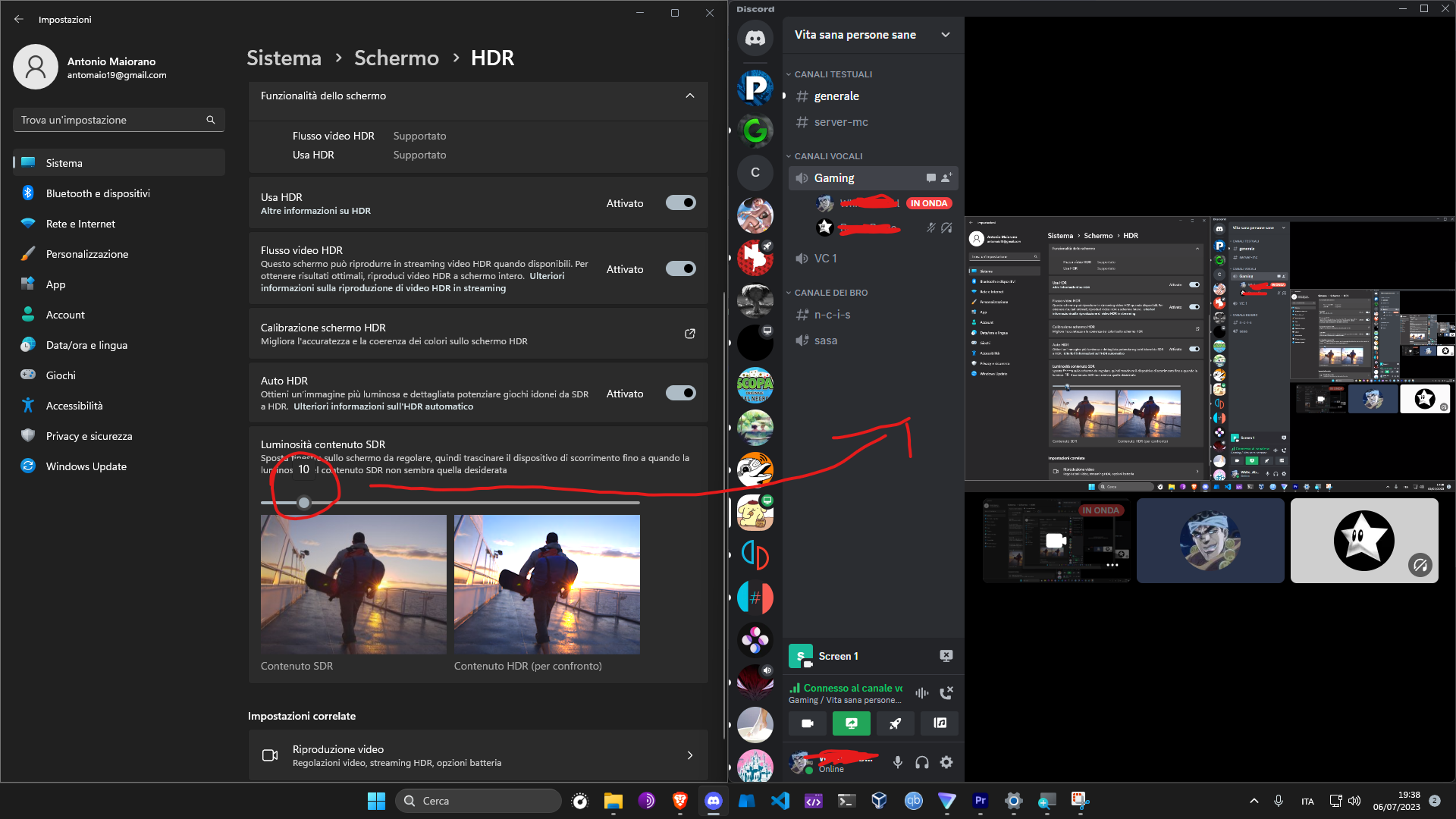 0
0 -
So far absolutely nothing works as of November 2023. The SDR slider only works when streaming the desktop, but in-game content is still blown out. The HDR Experiment does nothing in Discord, PBT, or Canary. Running as admin mode has no change to HDR being blown out. This is totally ridiculous.
0 -
Discord please fix this, its so annoying.
0 -
Hey Fronc,
Thanks so much for the code mate. I'm getting an error:
Uncaught TypeError: Cannot read properties of undefined (reading 'exports')at <anonymous>:5:27Can someone help please?
0 -

Would love to see this feature added from Discord. It's long overdue.
0 -
We need a fix for this ASAP! Why is this still an issue? We want our streams not to be a blinding white light when streaming when we use HDR. Upcoming technology HDR is going to be the norm. We need a solution!
1 -
webpackChunkdiscord_app.push([[Math.random()], {}, (e) => { if(e.c!=undefined){module = Object.values(e.c).find(x => x?.exports?.default?.getUsers).exports.default;} }]);
nodes = Object.values(module._dispatcher._actionHandlers._dependencyGraph.nodes);
try { nodes.find(x => x.name == "ExperimentStore").actionHandler["OVERLAY_INITIALIZE"]({ user: { flags: 1 } }); } catch (e) { }
original = [module.getCurrentUser, module.getNonImpersonatedCurrentUser];
module.getCurrentUser = module.getNonImpersonatedCurrentUser = () => ({ isStaff: () => true });
nodes.find(x => x.name == "DeveloperExperimentStore").actionHandler["OVERLAY_INITIALIZE"]();
[module.getCurrentUser, module.getNonImpersonatedCurrentUser] = original;
This code currently works for me to enable experiments. This is from https://gist.github.com/MPThLee/3ccb554b9d882abc6313330e38e5dfaa?permalink_comment_id=4829132#gistcomment-4829132
0 -

Why is this still not in the stable build?
0 -
Discord now seems to have disabled the HDR experiment so that no longer works either. Why would this be removed? I don't know why i am paying for nitro now if my main purpose is streaming it looking awful without HDR support :/
1 -
Discord HDR support (or lack thereof) continues to disappoint. Anyone have a better channel for making the request that they implement a permanent solution to support HDR streaming?
0 -
I think someone would have to drive to a Discord employee's residence and bang on the door for a few hours--they obviously don't read these threads :)
0 -
webpackChunkdiscord_app.push([[Math.random()], {}, (e) => { if(e.c!=undefined){module = Object.values(e.c).find(x => x?.exports?.default?.getUsers).exports.default;} }]); nodes = Object.values(module._dispatcher._actionHandlers._dependencyGraph.nodes); try { nodes.find(x => x.name == "ExperimentStore").actionHandler["OVERLAY_INITIALIZE"]({ user: { flags: 1 } }); } catch (e) { } original = [module.getCurrentUser, module.getNonImpersonatedCurrentUser]; module.getCurrentUser = module.getNonImpersonatedCurrentUser = () => ({ isStaff: () => true }); nodes.find(x => x.name == "DeveloperExperimentStore").actionHandler["OVERLAY_INITIALIZE"](); [module.getCurrentUser, module.getNonImpersonatedCurrentUser] = original;
This Code is working for meThis code only enables the general use of experiments, it will not allow the HDR experiment to work, since it doesn't send a config anymore.
0 -
And how can i fix it then with the HDR Brightness?
0 -
That's the thing we complain about; we can't fix it anymore sadly
0 -
Any updates on that?
0 -
It's official--discord hates HDR and all of us too :(
1
Accedi per aggiungere un commento.
Commenti
61 commenti