Awkward positioning of icons in toolbar

This is an issue that has been bothering me and others I know for a while. I've attached images below and as you can see, the location of the icons on the Discord toolbar varies depending on whether you're in a server, DM chat, or group chat. This makes it all too easy for a user to, for instance, click on the call button while trying to use the search function out of muscle memory.
I'm mostly writing this to address the issue on Android (not sure if this is the case on iOS) since that tends to cause the most mistakes in my experience, but I believe the desktop app could also stand to improve from aligning the icons that are always present on the left so that they don't shift when switching chats.
The current positioning has resulted in several accidental calls both outgoing and incoming, so adjusting this would be very much appreciated.
Images
Desktop
 Icons in a server
 Icons in a direct message chat
 Icons in a group chat
Mobile (Android)
 Icons in a server
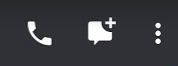 Icons in a direct message chat
 Icons in a group chat
-

Thank you for posting this one brother
0 -

I might have misunderstood your issue......
Will the following way help ?
Right click at the taskbar > make sure no checkmark at " Lock the Taskbar "
Left click at the taskbar and HOLD > drag the taskbar either to the bottom or at the top > let go Hold > lock the taskbar. PrepaidCardStatus0 -
Hey jecson, it seems you're describing the taskbar in Windows but that's not what I was referring to. I meant the menu inside the actual Discord UI, the same one where the search bar and icons from the pictures are located.
The problem isn't a user issue; it's just a design decision made by the Discord team of having the icons shift around which I believe is counter-intuitive.
0
Accedi per aggiungere un commento.
Commenti
3 commenti