Completely hide your camera when the "Pop Out" window is on.

Although, Discord does have an option to disable the camera while video chatting.
And when you disable "Show Non-Video Participants" and "Show My Camera." As shown below.
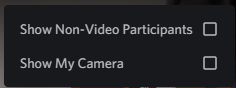
It does disable the camera, but the placeholder still shows in the "Pop Out" window, as seen in the image below.
So if you wanted the "Focused Participant" to be the only one in the pop-out, it would also include yourself in the "Pop Out" window.
This would lead to the problem of having your "Profile Picture" window covering the "Focused Participant" if the "Pop Out" window is very small. An example can be seen below.
In conclusion, this post is just a way to make video calling and screen sharing more immersive if the "Pop Out" UI could be modified to accommodate hiding and showing the "Profile Picture" window.
Thanks for hearing me out.
And make sure to drink some water.
:D
-

God please do this please i have seen 3 years 2 years ago people feedback you this why didnt do that .
4 -
It's easiest thing to add please add this option. I mean why why ???
4 -

This genuinely bothers me. I can't watch streams in full screen without my own face blocking parts of the content. Why on earth did they make it work this way? What's the point of disabling my camera if it just keeps the camera pop-up but now my pfp is there instead of my face? I have to turn my camera off or else I literally can't see what I'm watching. It's a ridiculous decision that makes an otherwise useful feature useless. Why isn't there just a basic “Hide camera popups when disabled” setting? How hard is that to do?
2
Accedi per aggiungere un commento.
Commenti
3 commenti