Why does discord randomly become very loud?

So if I'm in a voice chat it seems at random everyone and every discord notification will basically destroy my ears. At first everything will be fine an at the normal volume I set, but out of no where everything goes to max volume and it doesn't fix itself until I leave VC and join back.
-

Working fix
I've found a fix that doesn't require uninstalling Synapse as a whole (yes, the problem is definitely Synapse).
Just create a set of tournament drivers:
Open Synapse > click the down arrow in the top right corner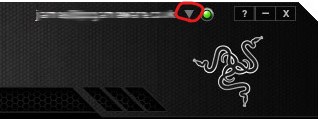
follow the instructions given to create tournament drivers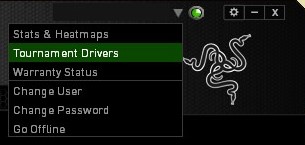
but make sure to uncheck the headset box from the list of drivers to be created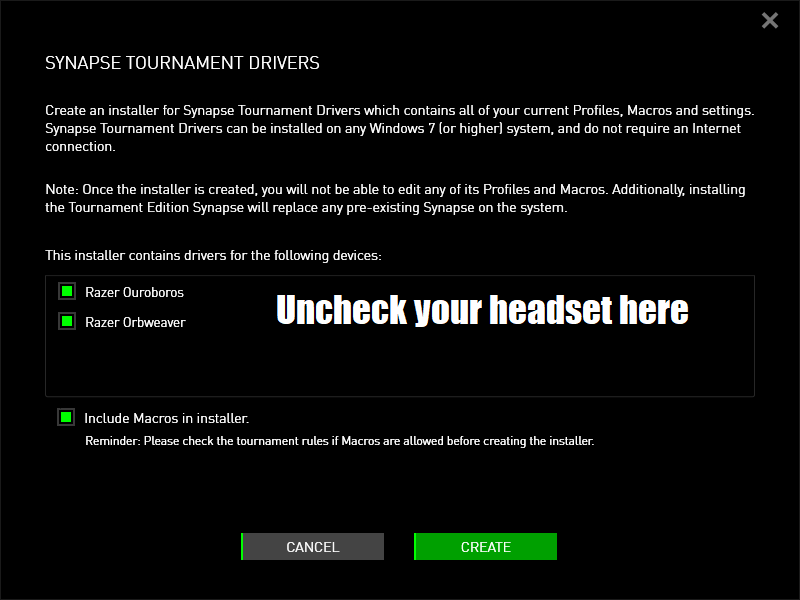
now simply install the newly generated software and that should do the job.
This fix has a few drawbacks:
You won't be able to manage your headset as Razer intended you to, as you will be using default drivers (not sure whether surround audio still works or not).Every other Razer device will work just fine.
You won't get any update for Synapse as the tournament drivers software will replace the regular Synapse and will work totally offline (this also means that any changes to your settings won't be synced across your devices).0 -

Uninstalling razer synapse did not work for me, but I found what was causing it.
In razer synapse, go to your headphone settings and change discord application from 7.1 to 2.0 sound setting.
I have no idea why it was set to 7.1, but it seems to leave it at that even after uninstalling, so you have to switch it back manually.1 -

1. Right click the discord application and set "Run as administrator"
2. Discord -> Settings -> Voice and Video -> Sound subsystem -> Legacy
0 -

Hey y'all
I have found a fix for this one, at least for those that still have this problem.
Oh, also, NO NEED to delete Razer Synapse, It's basically broken software, but below this text is how to actually fix it (below me)
In case if you're still having this problem, then follow these steps
1. Download Nvidia RTX Voice from here (https://www.nvidia.com/en-us/geforce/guides/nvidia-rtx-voice-setup-guide/)
2. In case if you don't have one of Nvidia's RTX or GTX graphic cards, follow then these instructions on this video (https://youtu.be/E9r0jPyHucs)
3. You will configure there what are you using devices on Nvidia's RTX Voice program.
4. After it's done, go to Discord and make default output device called "Speakers (Nvidia RTX Voice)" (which is Nvidia's app
That's it, at least it worked for me.0 -

This is still an issue in 2021. I use a Razer Kraken 7.1 Chroma. It just happened to me a few minutes ago.
0 -

Its a lost cause man, Razer is never going to fix the software of a 7 years (i think) old product. I just bought the Razer Nari Essential for super cheap i think like 60 dolars or something like that. They are more than i need for what i use them.
0
サインインしてコメントを残してください。
コメント
96件のコメント