Option To Hide Sidebar

Add an option to hide the sidebar so that your Video Call goes into this semi full-screen mode.
-

Bumping for feature add. I’ll try out all the above suggestions later as alts. Thanks for all of them. :)
3 -

bump for this feature and make it hotkey-able please <3
2 -

bump please
2 -

Right besides "What's the purpose of human life?" and "What came before the big bang?" comes the third most unanswerable question of all times: "How can a 2021 app with the adoption of Discord not have an option to hide a side panel?"
2 -

Bump! I need to hide sidebar when splitscreen...
2 -

BUMP!!!!
We NEED an option to collapse the left sidebars for the list of servers and channels.
The server icons and channel list is distracting - why doesn't discord have the option for a smooth, minimalistic appearance when viewing a channel???
1 -

Bump again - if you manage to do it through dev tools, it looks really nice

It's a shame you can't do it through a button or something - it would look nice on small screens without an official mobile app.
4 -
iSlammedMyKindle are you able to share how you did that? And I assume it could be applied to the right side as well?
2 -

Bump!
2 -

When discord is gonna implement this ;-;
3 -

bump
2 -

What's it going to take for Discord to implement this one simple request? People have been asking for this for years. This is ridiculous.
4 -
To think that discord hasn't yet implemented this feature is really sad.
5 -

This would be an useful feature.
2 -
Bump! Add this when DISCORD
3 -

If you want a full screen view without the tabs well views a stream thru discord just use the PoP-out function :S
1 -
WilsonW ah can you explain more briefly ?
what we meant is to add some functionality to hide the channels bar of server to make the window looks more smaller and we can only see the server chat in we were inside3 -

Bumping, pretty please
1 -

BUMPITY BUMPITY BUMP THIS POST!
2 -

Ah wish discord just implements this soon #Bump lol
2 -

Jesus 2+ years and still not an official answer.
Bump
1 -

BUMPPPPPPPPP{OIHUGYTFRDESWRXDGCFHTGVJYKLM
2 YEARS T___T
1 -

Super happy I can uninstall the desktop Discord app and create a Chromium web app shortcut instead with this extension: https://chrome.google.com/webstore/detail/hide-discord-sidebar/kaaohmdnmbdagpnenakakpkinddjmenp
Not made by me, seems to have 10k users, open source on Github. Looks like the dev made a Firefox extension too. https://github.com/patrickxchong/hide-discord-sidebar
1 -

It is strange that Discord is lacking so many of these basic UI/UX/usability features. Something as simple as a sidebar toggle (which you can find requests for going back 5+ years), custom colors/themes, and (until 3 days ago) fast account switching for example. I use Slack for work all day and it's a joy to use. Discord on the other hand is kind of a chore to use. It works. But it could be so much better.
1 -
Almost five years guys!
Bump!1 -

I'd like to offer a quick fix for now, which only shows the sidebar on hover. I based it on one of the previous answers in this thread but made it a bit neater, and you can re-enable it rather easily anytime you relaunch Discord by simply opening and closing Dev Tools for a second. It works like so:
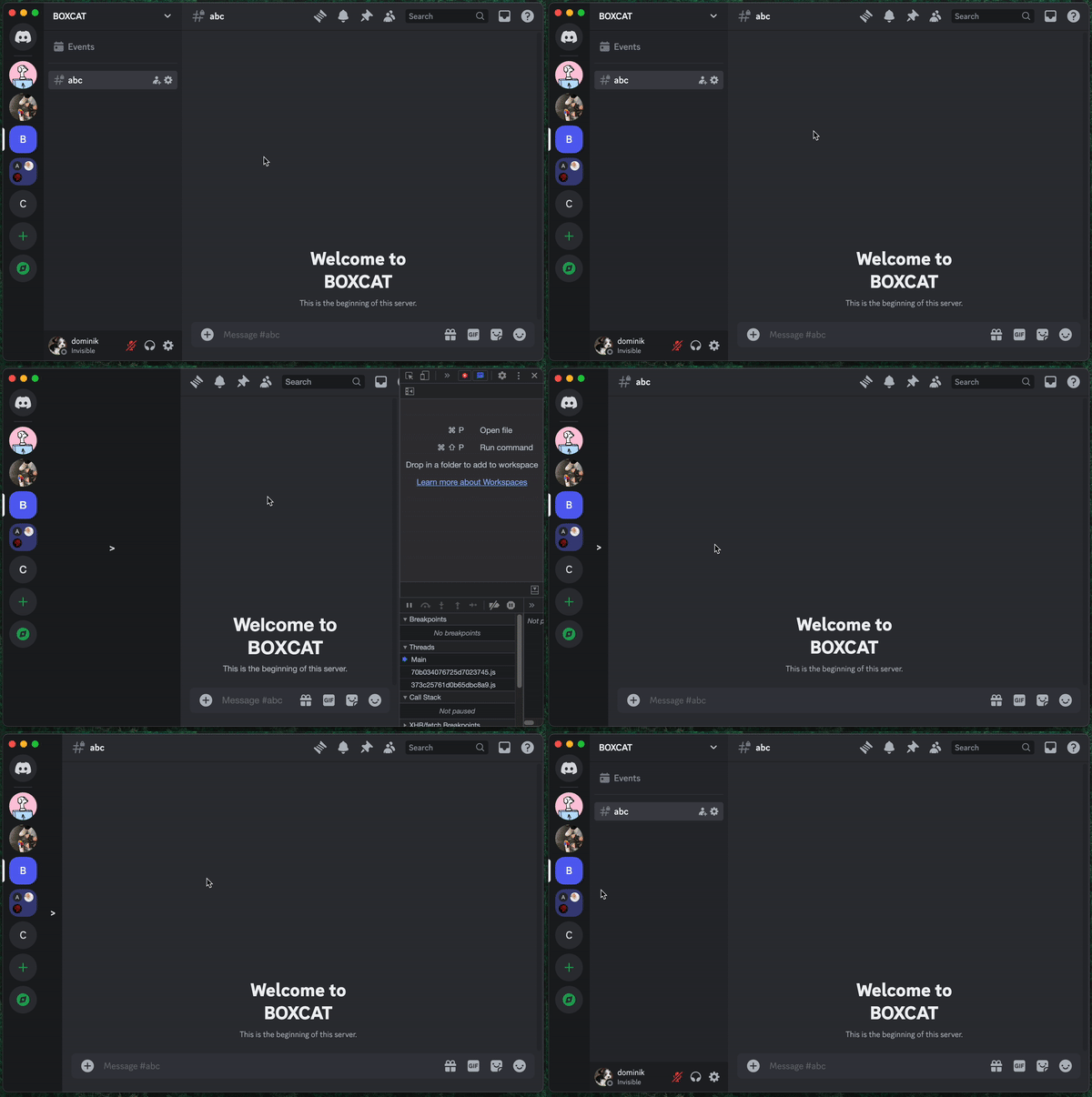
Instructions
- Open Dev Tools (Ctrl + Shift + I or Cmd + Opt + I on Mac)
- Go to the Sources tab and in the left sidebar open the Overrides tab.
- Click Select folder for overrides and choose a new empty folder (you can create it anywhere on your computer).
- Make sure the Enable Local Overrides checkbox is enabled.
- In the same sidebar, go to the Page tab.
- Inside top > Electron Isolated Context > assets find a file named app.randomstring.css, it's gonna look something like app.50807f069b2c39bacce2.css.
- Right click the file and choose “Save for overrides”. The file should open. If not, double click it.
- Paste in the following CSS rules at the bottom of the file:
[class^="sidebar_"] {
 position: relative;
 width: 32px;
 transition: width .2s ease-in;
}

[class^="sidebar_"]:hover {
 width: 240px;
 transition-timing-function: ease-out;
 transition-delay: 0.1s;
}

[class^="sidebar_"]::before {
 content: '>';

 position: absolute;
 top: 0;
 left: 0;
 z-index:999;
 width: 100%;
 height: 100%;
 display: flex;
 justify-content: center;
 align-items: center;

 background-color: var(--background-tertiary);

 color: var(--text-normal);
 font-weight: bold;

 opacity: 100%;
 transition: opacity .2s ease-in;
}

[class^="sidebar_"]:hover::before {
 opacity: 0%;
 pointer-events: none;
 transition-delay: 0.1s;
}
That's it, the sidebar should shrink now. Anytime you relaunch Discord, all you have to do is hit the Dev Tools shortcut, wait half a second for the CSS rules to load, then hit the Dev Tools shortcut again. It's not ideal or bug free and I believe Discord should just implement hiding the sidebar as an actual feature, but I hope this helps some people for now.
1 -
bump
please for the love of god, I use 12inch monitor only1
U moet u aanmelden om een opmerking te plaatsen.
Opmerkingen
87 opmerkingen