Remove lock icons on voice channels when the @everyone role doesn't have "view channel" perms.

Currently, text channels will only show the lock icon when the @everyone role is specifically denied the "view channel" permissions on it. However, voice channels will show it whenever the @everyone role cannot view the channel (by simply lacking the permission) even if it doesn't have any channel-specific perms.
I already know that this is a bug, but hear me out, I did post this in the correct place. The bug report for this is in favor of adding the lock icon back to text channels, which would look extremely ugly in servers that require you to have a role to chat. This suggestion is simply to change that focus into making the lock icon on VC channels work the same as on text channels, instead of the other way around.
-

Text channels will show the lock if they are only accessible by users with the role. If it's at @everyone perm to see the channels then they won't have a lock since @everyone is the role that is granted to all users when they first join. You can set your @everyone role to have no permissions by default and allow them to only see channels you want them to see and when they get a role they can no longer see the channels you don't want them to see anymore. Also the bug report linked is blank.
-3 -

The padlock icons on voice channel icons is confusing. Some people on my servers think they don't have access to voice channels and so don't bother trying to connect to them.
1 -

Perhaps this is old new for some. But I solved this (while @everyone had deny on all permissions on the server level) by granting Connect to @everyone on the voice channels. If you don't have any other role (other than @everyone) you still can't see the voice channels, and so still can't connect. But the pad lock is gone for everyone else with a role that can see and connect to the voice channels.
5 -

Rukhs!! This WORKED! Thank you so much!
It also works with text channels as well! Finally a fix to this! haha3 -

@Astral You're wrong. OP is right. Padlock icon only shows on text channels when the permission is denied on the channel itself, not when it's a global server rule. But it doesn't work the same way with voice channels.
Granting "connect" permission to @everyone on global server rules indeed removes the padlock icon.
But don't forget they cannot see the channel but can now "connect" to it! E.G. : if some moderators mess up with invitation on this channel, and the links are shared all over the web, litterally anyone could connect to this channel.
I personnally prefer to wait for discord to fix it and don't allow "connect" to everyone.
0 -

Rukhs, how exactly did you do this mate? I tried but it's not working ;-;
0 -
The default permissions for @everyone in Server Settings are essentially deny on everything.
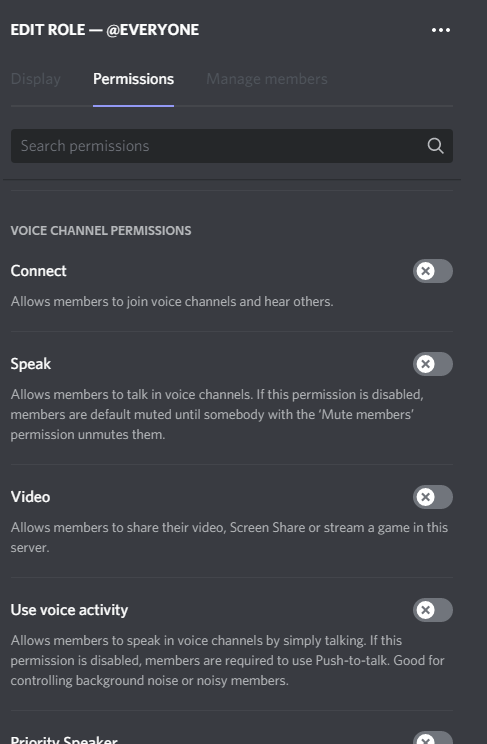
Then for each voice channel permissions where we want to remove the padlock on, we allow "Connect" to @everyone under the heading "Voice Channel Permissions". (Everything else is using the default permissions.)

That is all.
0
Zaloguj się, aby dodać komentarz.
Komentarze
Komentarze: 7