Show default server permissions when adding/editing new channels

After spending time setting up and editing a new server, I found myself a little frustrated having to go back and forth into the server role settings just so I could remember what permissions I allowed to certain user roles when adding new channels.
To resolve this I came up with an idea to help make it easier for server owners to remember what roles have what permissions assigned to them by default in the server settings.
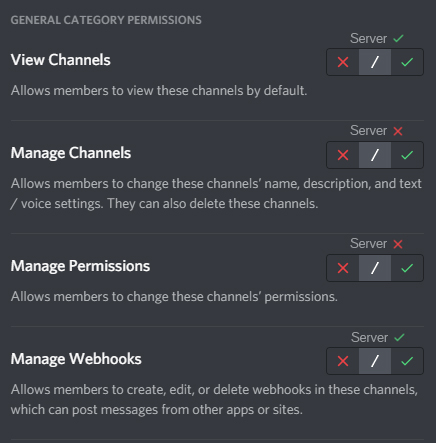
Essentially Discord could add a notice above or next to each permission to show what the default server permission are when editing permissions on new channels, that way server admins no longer need to either keep a list open of what permissions each role has, or keep going back and forth between server settings and channel settings.
It could even just show the current inherited permission in that category/channel based on the permissions of the role under them in the hierarchy as well.
I made a quick mock-up of what this idea could potentially look like
-

Yes!
When configuring roles on my big server I have so much pain to remember which roles inherits which values. I need to switch back to configuring server-default role / category role and check which rights used as default for server/category. It's very painful.
But in role-configuring window we have 3-buttons (disabled, inherited, enabled). Can you make some graphics, that shows us the inherited value from category / server. It will be really helpful to config this big trees of roles.0
Du måste logga in om du vill lämna en kommentar.
Kommentarer
1 kommentar