Visual Studio Code Integration

Description
There is a large following of programmers on Discord, which house some of the largest communities on Discord as a whole. Both Python and Reactiflux have Discord servers in the hundred thousand range, and with 200 million users at least 5% of those are programmers. Therefore, it is vital that these communities are appreciated, which is where Visual Studio Code Integration comes in.
Imagine this. You're new to programming and you're using Visual Studio Code (an IDE owned by Microsoft, who have collaborated with Discord in the past via Xbox). You connect your Microsoft account to Discord, and Discord detects you have Visual Studio Code open. Your friend knows a lot about the language you're programming in (for this example, let's say JavaScript). You encountered an error in your program and don't know how to fix it (best I could come up with, although there are certainly better reasons). Your friend clicks on your profile and sees you have VSC open:
and clicks "Invite to collaborate". You accept the invite, and now your friend is in your same index.js file who can (hopefully) help you with your issue.
Processes at work
There's three things that make this work:
- A Microsoft account integration
- Permission to use an invite functionality
- Data for VSC
Discord can make both of these work by first, collaborating with Microsoft to allow a connection to a Microsoft account (which shouldn't be too hard considering in theory it's not too dissimilar to Xbox Live's integration which is just a simple OAuth2 sign-in method), allowing for a "single invite" button with Visual Studio Code, and allowing for Discord to use VSC data per user to share it (with permission, of course).
Additional information
Here's some more images if you need them:
This one is to be used when a user doesn't have their Microsoft account connected.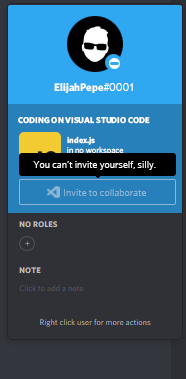
This is to be used when someone is trying to invite themselves to collaborate
This is to be used when you're viewing the popout as yourself.
Du måste logga in om du vill lämna en kommentar.
Kommentarer
0 kommentarer