Update Install Loop

1/27/2020 I started the update and it has been stuck in a constant install/update cycle and refuses to load further.
I have uninstalled the program completely, reinstalled it. Deleted the discord folders in appdata and still this is happening.
Any advice would be grateful.
-

Guys, after months with this problem in Win10, I solved it with the following procedure:
1 - It was necessary to restart the computer in Safe Mode.2 - Press Window KEY + R and type msconfig to open the System Configuration
3 - Click on "Boot" and mark the option "Safe Boot" with Network (you can try other options)
4 - Restart the computer in Safe mode
5 - Open Discord.exe. The program will try to update unsuccessfully because the network probably is not available
6 - Close Discord7 - Disable the Safe boot in msconfig and restart the computer
8 - As soon as the Windows 10 starts, open Discord and the loop error will be eliminated!
It worked for me.0 -

FIXED:)
c:/users/username/appdata/local/discord/app-0.0309
Please try what I'm about to say if your still having problems updating or starting Discord. I've been trying for 5 days and this worked for me after trying EVERYTHING I've found on the net which consisted of about 10 things and all that %appdata% %localappdata% sh!!.
Well now that your use to doing it type in %localappdata% and go into your discord folder. Mine had about 3 things in it
I cant remember now but i think it had the downloading exe in here or something like that if yours does too just delete that dont rename it just delete it
Mine had a folder along the lines of app-0.0.3309 in it
Open that folder and right click on the Discord Application and run as administrator.
Mine updated and started right up after 5 days of trying everything on the net.
If you've tried all that and it didn't work this will:)
1 -

Same fix for me as Kaz. Looks like Discord wont run without TLS 1.0 and 1.1 enabled on your client machine. Also need MD5 and SHA hashes enabled along with Diffie-Hellman Key exchange. I had these disabled due to CVE's that have come out regarding them.
Instead of hacking the registry. NARTAC Software has a free tool with GUI front end to enable/disabled these. Screenshot attached. (IISCrypto)
https://www.nartac.com/Products/IISCrypto/To get discord to run properly. I had to enable TLS 1.0, MD5, SHA, and Diffie-Hellman options.
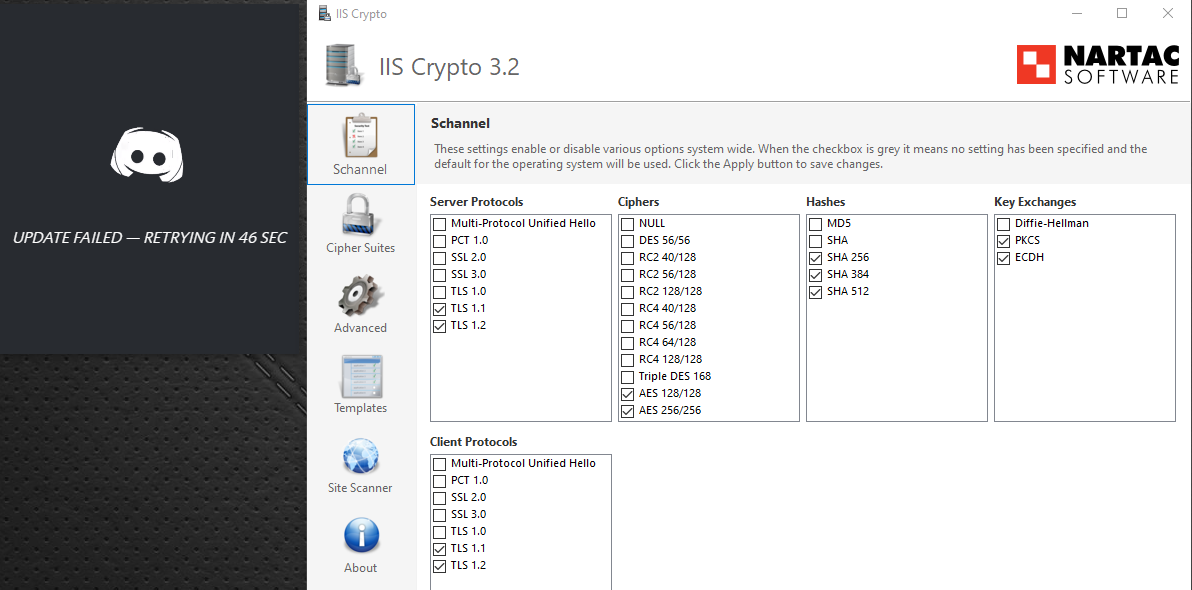
Further reading on these settings:
TLS 1.0, and 1.1: https://docs.microsoft.com/en-us/lifecycle/announcements/transport-layer-security-1x-disablement
Diffie-Hellman CVE: https://www.cvedetails.com/cve/CVE-2011-5095/
MD5 CVE: https://www.cvedetails.com/cve/CVE-2004-2761/
SHA CVE: https://www.cvedetails.com/cve/CVE-2005-4900/1 -

Happened to me several times. I just turn my antivirus protection off and open Discord. Once it's past the loop, you can turn protection back on
0 -

Discord requires TLS1.0 to update at startup or with a new installation (see post Pistol_Pete). Discord support tells me to use the feedback forum (no fix yet). Please vote up.
1 -

i have been trying and trying and trying and trying nothing has happened i tried what damien has said and pretty much everything still nothing i just need this fixed
0 -

Hey my issue was different but i havnt seen this posted yet, check the windows manual proxy settings and turn them off.
0
Du måste logga in om du vill lämna en kommentar.
Kommentarer
37 kommentarer