I deleted your program from my W10 computer. Here's why

1. Your program continued running when closed and I couldn't shut the program down from the Task Manager. When I want to shut down a program, I want it gone. If your program won't allow that, I wash my hands of your heresy.
2. I got random beeps from your closed program that wouldn't leave my services list even when "shut down".
-

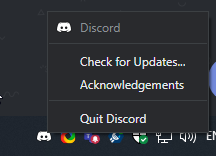
Open your system tray, drag Discord down to the taskbar, right click the app and then press "quit Discord", this should completely close Discord and there will be no beeping sounds, as for the sounds if you want Discord open but no production of noises or anything, you should go to User settings, press "Notifications" and disable it for messages. Mainly it will keep beeping because there are messages being sent in a server you're in.

 0
0
Yorum yazmak için lütfen oturum açın.
Yorumlar
1 yorum