Disable Mobile App Animations

I have visual focus issues; my eye muscles have trouble focusing in a quick way, and while I have corrective lens for the distance issues it causes, some issues (such as motion, particularly in a digital/2D form) can't be corrected. I held out as long as I could, but keyboard glitches forced me to update the app (Android) and now the constant animations are giving me eye strain and reading disorientation when using the app. One minor example is moving between the list of chats/servers into a specific message channel, with how everything kind of slides/shifts around. It was much more easy when the channel list was the object that moved and the messages were stationary. The biggest culprit however is when focusing the message entry field and typing; the "closing" animation of the photo & camera menus, and how it moves the entire text bar, makes sending messages a nightmare. I have found myself avoiding using the app at all just to avoid the headaches it causes. It would be really great if there was some sort of accessibility option which would use a layout that's more "stable." Otherwise, I may have to give up using the app.
Edit:
To clarify, since I get this may not be a well-understood concept or it may be something not thought of, the specific issue I have is called "accommodative infacility" (sometimes called accommodative inertia) which means that whenever my eyes need to change focus, such as following a moving object, looking from one object to another, changing focus from something thats close -> something thats far--and vice versa--that my eyes take longer than normal to focus, meaning that I have blurred vision (for me, blurred vision in the "focus" field, though for some it can sometimes result in the entire vision including the peripherals to blur) during that transition. It's somewhat similar to myopia (nearsightedness), as things that are "closer" are usually easier to focus on, but it varies from person to person.
Therefore, the main symptoms it can cause include headaches, eye fatigue (i.e. gets increasingly harder to focus properly when switching between focus points, which is unavoidable in life), pain in the eyes, and motion sickness. The general "hallmark" of it is a sort of visual disturbance that comes from visual disorientation, i.e. the lag between looking at one thing and looking at something new.
This is where the new UI has issues. Both of the above animations actively move what my eyes have currently focused on: for opening the message list menu, the focus was previously the message screen; for typing, the focus was the text entry field. By taking what the user is currently looking at and moving it, it causes that disorientation to occur. Rather than remaining focused on something and being able to more smoothly transition to the new focus point (such as keeping my eyes on the message screen while the message list menu pops into view), instead the new animations actively disrupt my entire visual field of the interface, meaning it is a greater disruption and more actively aggravates the above symptoms (headaches, eye fatigue, disorientation).
Ways to consider accessible design include keeping in mind what the eyes are going to already be focused on, and keep them stable when new animations occur. Think of it like standing on a rug. Instead of moving the rug out from under someone's feet so that you can put a new rug there, instead lay the new rug over it so that they have time to step onto the new rug and get their footing.
For anyone who comes upon this post with similar issues, I've taken notes of the versions I tested and what features they had while I was looking for which version to rollback to. Please note that these are Android; I can't test with an iOS device, so you may have different results. I also only tested "stable" releases, i.e. no beta.
Version 23.0:
- Original menu function (opening menu causes the menu to open over top of the message screen, rather than pushing it aside).
- New keyboard, with the new animations (the camera and photo buttons are visible when you open the text entry field; they collapse when you start typing).
Version 17.0:
- Original menu function
- New keyboard, automatically condenses the photo/camera buttons to the side when you open the keyboard, and keeps those buttons collapsed until you open them manually.
- (This is the one I'm going to use for now; the fact the buttons are automatically condensed when opening the text entry remedies the typing issue, and it's the most recent/up to date version of the app that I can use functionably.)
Version 15.6:
- Original menu function
- Original keyboard, i.e. the camera/file upload function is hidden in a + menu.
-

I'm using Version 36.6 (Android Beta),
Are these issues still present in the latest versions? I'm curious.
As far as android goes, you can enable developer mode and completely disable transitional animations, i dont know if you've done this already, but the animation scale in developer options apply to most if not all playstore apps globally.This should help with some animation issues? I can do some testing on my end and keep you updated, you can find these settings here setting them to Zero should disable them across your whole device
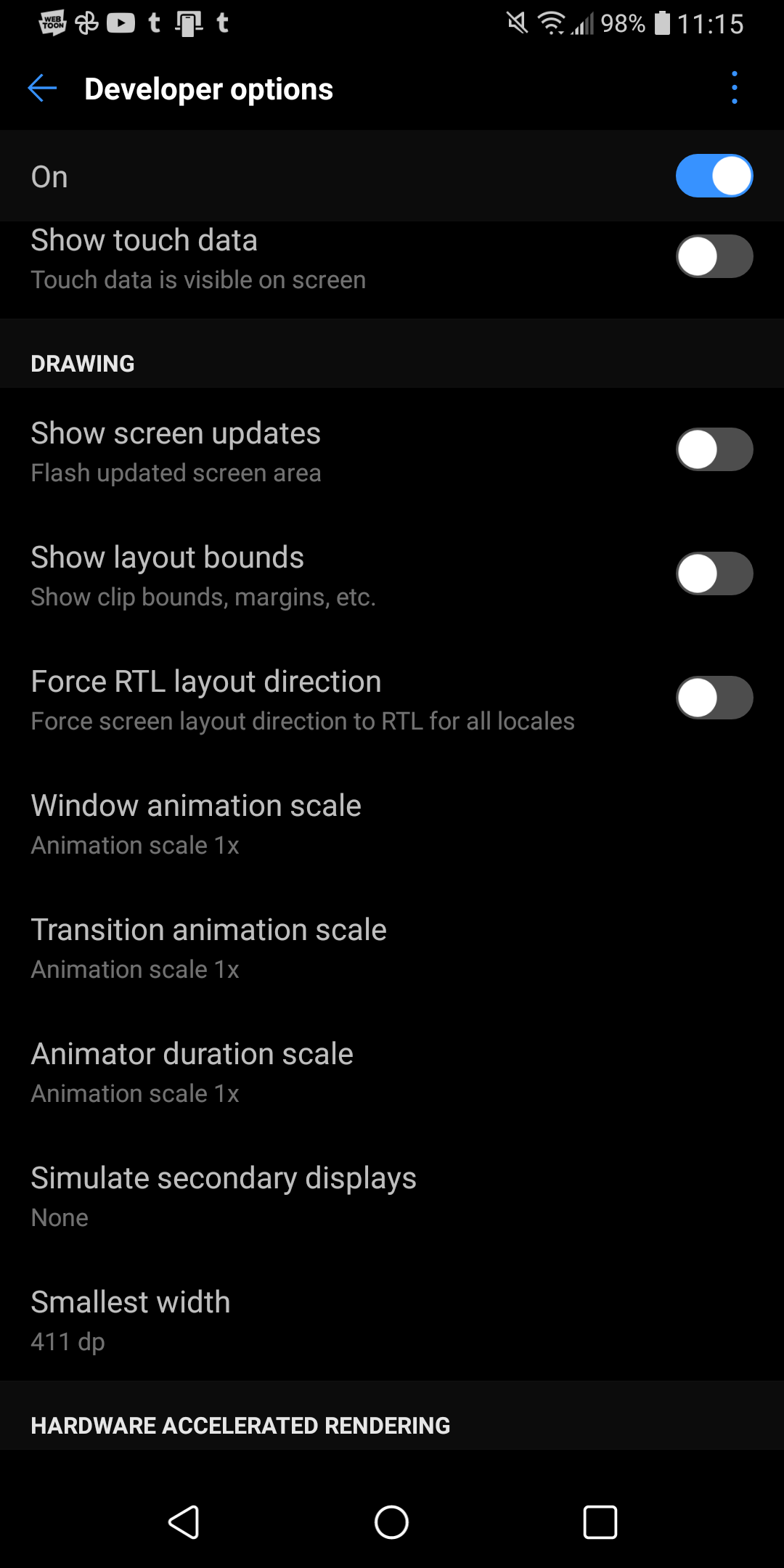 0
0 -
Yeah after some minor testing, disabling the animations do somewhat solve this problem.
As far as desktop goes, you can't completely disable them like on android but you can head into Appearance and enable reduced motion
0 -
a link to the relevant support topic
0
Yorum yazmak için lütfen oturum açın.
Yorumlar
3 yorum