Add a Text Chat linked to each Voice & Stage Channel

There should be a pop-up chat, or side chat option for Voice Channels. This way, we can chat and be in a voice channel without switching between the two. It'll also be great for movie streaming and chatting at the same time.
Maybe the chat feature could be added to the new Stage channel as well.
5
-

.Jonathan! Hey! I created this exact suggestion the other day and it even includes mock-up examples.
Check it out, here!3 -

(*Edit, I missunderstanded u..........* )
U can just do it(in 2 ways):
1.
- Copy the channels ID,
- go to a text channel, and write this:
<#>
- Now copy and paste the VC's ID after the # mark
- Press enter.
Example images:
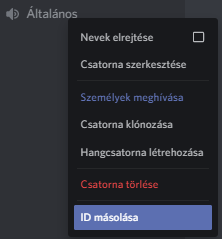
- I copied the VC's ID

- I typed '<#>' to then paste the channel's ID at the end of the # mark
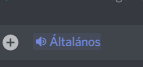
- I copied the ID after the # mark inside the <> brackets, and its looks like this.
After, if u click on it, it will connect u to the VC.
2.
create an invite for the VC as shown:
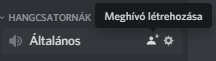
simply copy the invite URL:

And paste where ever u want:
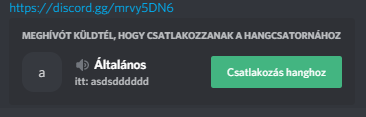
- It'll look like this with a green 'join' button
1
請登入寫評論。
評論
2 條評論