I can't Move Channels (rearrange) Up and down for PC Windows 10.!

Hello, I own Servers and Mod in a few others. I cannot move/rearrange any of the Channels. I could do this a week ago.. but now it's not letting me?? Why?
I noticed past statements about this... Is this bug still not fixed?? It's annoying. Please fix it.
This is for the PC at discord.com . And before you ask... I use it here.. not on my cell phone. I shouldn't HAVE to need it both places.
I hope this can be fixed.
Thank you for your time.
-

i'm having a similar issue and it keeps asking me to upload and it's super frustrating.
0 -

i have the same problem anyone know how to fix it ?
0 -
In case any of you still have this issue, try this:
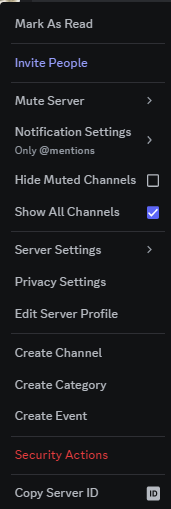
Go to your Channel settings and select the option "Show All Channels". After that (if you have the correct permissions), you can move the channels and rearrange them.
0 -

Where are the channel settings rodrigo caldas?
0 -

lol... guys just turn on Show All Channels😂
0 -
To fix this issue:

1. If you have a channel dragged as a link - open the server menu (from where you can go to the server settings) and select "Show all channels"

2. The channel simply does not move - try moving it either by the gear (channel settings) or by the empty space on the left
1 -

For anyone still having this issue and the "to the left of the #" and "drag and drop from the gear icon" solutions don't work (and also have all their channels showing), try using this solution:
https://support.discord.com/hc/en-us/articles/4408877527703-Accessible-Drag-and-Drop-FAQ
Nothing else helped me on both the web client and the desktop app, but this did help :)
0 -

Click on Show All Channels!
0 -
Hi Everyone! :D
After I checked “Show All Channels” I was able to click and drag channels and categories again.
Hope that helps! :D1 -
@foxobyte
Tysm
It works
Just right click (left screen) on your channel and after that click show all channels0 -
There is another option for this, you can click right click the server icon, then tick the box, “show all channels” and it should work again.
 0
0 -
Many individuals in South Africa often turn to the SASSA Status Check to monitor their application progress. Whether it's a general SASSA Status or a more specific query like the SASSA Status Check for R350 grants, people rely heavily on these updates. Moreover, for those who face challenges or discrepancies, the SASSA Appeal process becomes crucial. It's essential to stay informed, especially when dealing with financial assistance. The intricacies of SDR SASSA and the various nuances of SASSA SRD further emphasize the importance of understanding and navigating the system effectively.
0 -
Leme know if this helped

Yall need to enable "Show All Channels"
it might be something to do with onboarding2
請登入寫評論。
評論
43 條評論