Screenshare gets blurry afer a while.

A friend has a problem where every time he shares his screen, it will randomly become blurry at a random point (sometimes after having shared for 10 minutes, sometimes already after one minute). When this happens and he watches his own stream he sees it properly, but everyone else in the call doesn't.
When the screen is becoming "blurry", everything that moves on the screen will get pixelated and everything static will remain sharp.
-

I have the same issue with my stream and it's annoying. It start fine, after a few minutes it becomes blurry. Restarting the stream fixes it for a few minutes but then it start again.
I have a 750 Mbps upload line, an AMD Ryzen 3700x, 32GB of ram.
2 -

It looks like this may be a Ryzen problem, me and my cousin own Radeon cards but he owns a intel cpu (9700k) and I own the 3700x paired with a 5700xt. for some reason I’ve noticed when people have ryzen cards it goes blurry after a little. it’s annoying that we have to restart every 5-10 mins. Anybody found a solution?
4 -

Same problem here and it´s really annoying... I have Ryzen 5 2600 paired with RX 580... Upload speed around 8 Mbits.
2 -

Same problem. (I have Ryzen 5 3500U with Radeon Vega Mobile Gfx)
1 -

I have the same problem, I hope there will be a solution at some point. (Ryzen 5 3600 and Radeon RX 5700)
2 -
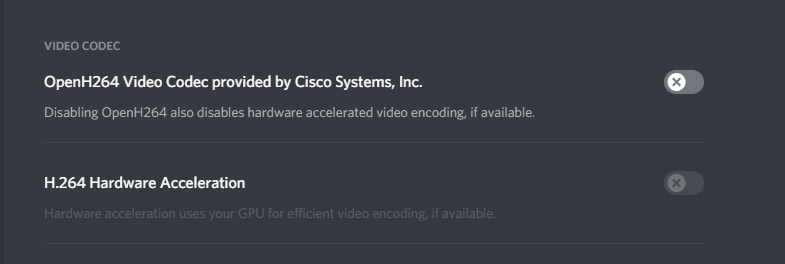

Try these settings. Then restart Discord. It worked for me.
5 -
Isar, greaseDonkey, 7Brandon, deloo, Henjurama Try the settings from post above this one.
1 -
Majkl Thank you for the quick response, it seems to have fixed it for me as well.
0 -
No problem, Im happy to help!
0
請登入寫評論。
評論
9 條評論