Yep, the new hack got me.

I got a ping from a friend of mine who was actually a game developer in regards to the new 'game', and I agreed to try it out.
Sure enough, e-mail address was changed as well as the password, but I was somehow half logged in/half logged out so I was able to see the e-mail address they had used.
Opened two tickets, and so far nothing. So for right now I'm signing that e-mail address up for all sorts of spam/pr0n/etc., while constantly asking to change the password.
That is NOT my e-mail address, but that IS my masked phone #.
-

Hi there - I unfortunately fell for the same BS too. So far Discord did ask me for the Email that was previously linked to my account and the name and tag, but after that they just said they are "escalating" my ticket. That same SeeMo person/people/whatever deleted one of my servers, and has been leaving other servers according to my friends. This is super frustrating, and my account is old too - probably from 2016 or something like that.
Well, at least we can commiserate together.
1 -

This happened to a friend, and almost happened to me. He completely lost his account because they changed his password and removed his 2FA, then added their own 2FA to it, so he probably won't be getting it back. What happened to me though was different, when i clicked the .exe file, it told me it injected my discord , logged me out, and asked me to put in my email and password again... which i didn't. What i did and what everyone should do if you ever run into this whether it's first time or last time, is DO NOT put in your email and password once it logs you out the first time. (The hackers have already injected your discord and they can track what you're typing into the email and password fields) that's how they get your info. However, this is what you should do, besides contacting discord about it.
1. Once the discord has been injected and it logs you out (DO NOT LOG BACK IN, THIS IS VERY IMPORTANT), download RevoUninstaller. Using that, uninstall Discord, after that it will ask you to do a scan of the files that are associated with Discord. Click "Advanced" on the scan options, it will most likely find leftover Registry and Files and Folders. ***DELETE THEM ALL*** (At the same time, download Discord on your phone, log in through that and change your password ASAP. DO NOT DO THIS ON THE INFECTED PC)
2. Type in windows search bar "virus and threat protection", click it, go to "Scan Options" and do a "Microsoft Defender Offline Scan", it will restart your PC then scan it for malware.
3. Go to "https://www.microsoft.com/en-us/download/details.aspx?id=9905" download their Removal Tool, do a scan with that and delete anything that comes up after the scan.
4. These 2 things will most likely find anything that the malware or virus left behind, make sure you delete those files when asked, or if nothing comes up and your PC is safe, then re-install discord and then finally log back into your account.
What saved my account was not re-logging back in after the discord client has been injected with the virus, and also 2FA.
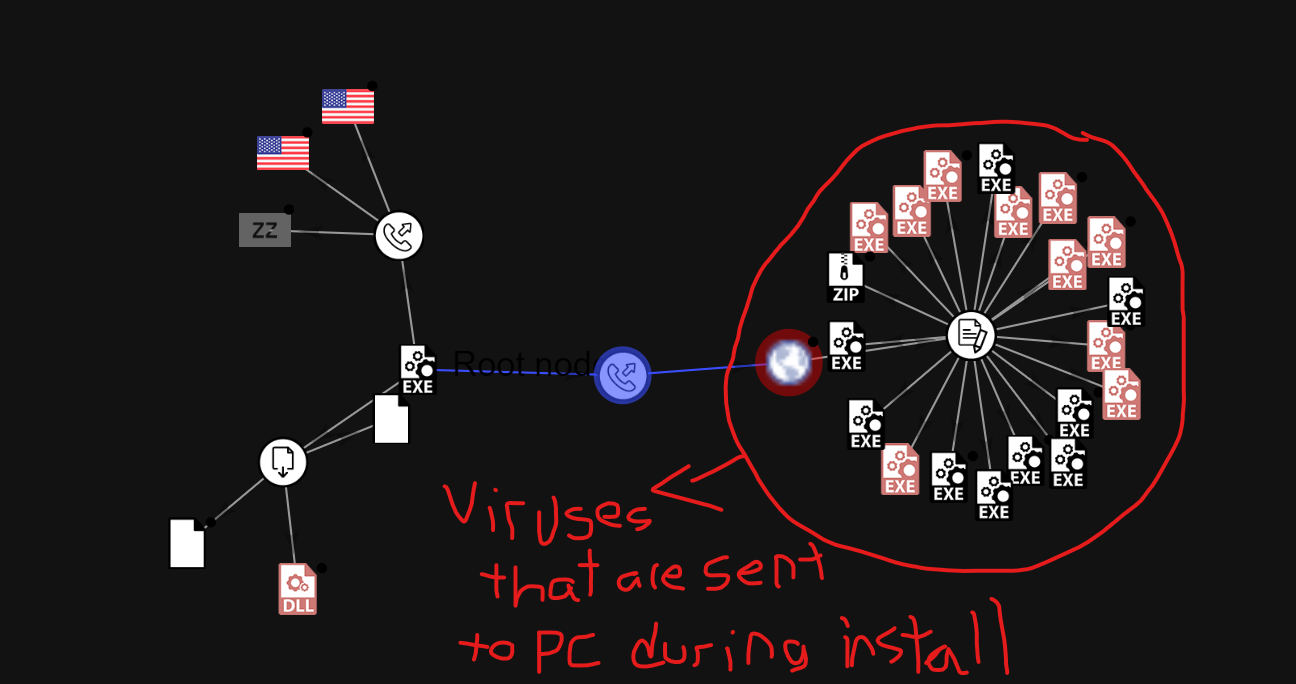
Also... what i found out is that this virus doesn't just take over your account, it also contacts a website that ends up downloading other files that have viruses in them, which is important that you should scan your PC with more than one anti-virus. I scanned the .exe file alone through multiple websites that identify viruses and they didn't find anything wrong, because the virus itself isn't in the .exe file, it's in the files that are being downloaded once you start installing it.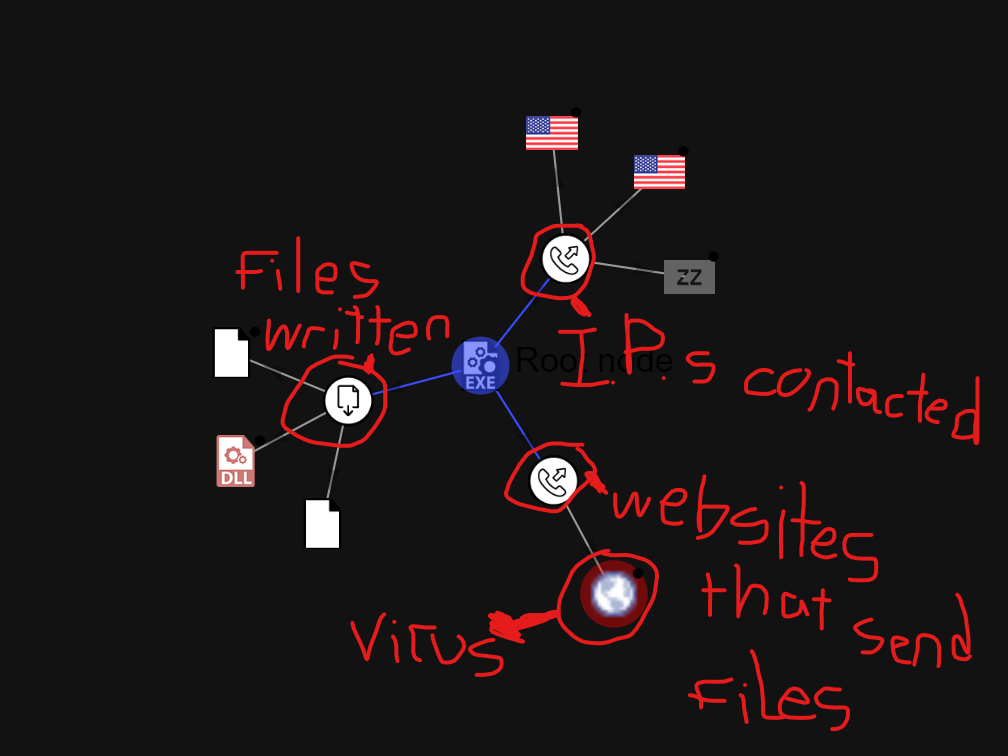
THE WEBSITE WHERE I DOWNLOADED THE GAME/VIRUS (It's been taken down)
https://spaceinvention.repl.co/0
請登入寫評論。
評論
32 條評論