Can't copy images by right clicking


I right click on the image in discord, it brings up the menu that says "copy image" or "save image" etc, but when I click on "copy image" it just gives me a little pop up window that says "Error unable to copy image preview" this is a completely new problem and I have no idea why it started.
-

Ok So I Have Had This Problem Before All You Need To Do Is Install Discord PTB. Beware It Can Be Very Unstable But It Helps The Problem https://discordapp.com/api/download/ptb?platform=win
0 -

I cannot copy images either. I found a solution of clicking the "copy link" button then sending the link to whoever I want to send the image too. This displays it normally and is quicker than resending the image.
0 -

not sure if someone else made this comment yet, but you can copy it another way. more steps but doesnt need any third party apps to do.
right click>open link> right click the image> copy image and paste.
less convenient but works! :]0 -

i don't know if you have found an answer to this problem yet but you can just right click and open the image in your browser then save it from there
(note it was already here)
0 -

If you're using Avast antivirus, then uncheck discord off your Do not Disturb list on the Avast app.
Then restart discord.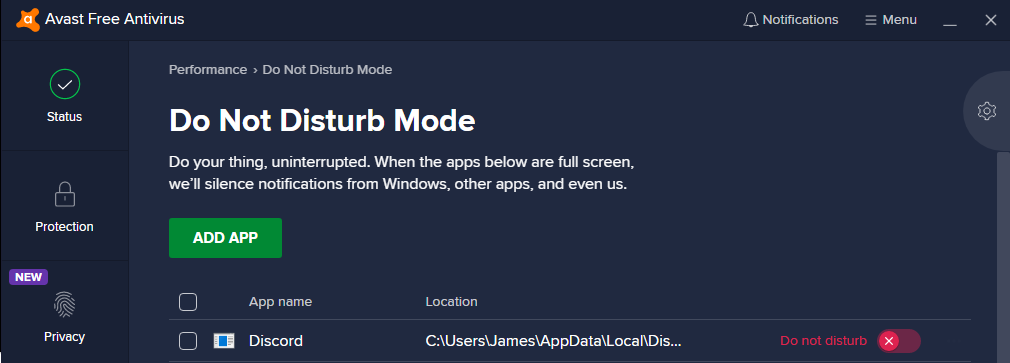 0
0 -

Same problem
0 -

do a complete uninstall and delete cache then re-install discord, this should solve the issue. the issue happened to me cause of copies of the same discord files so it should probably fix it for you
1 -

legend you're a lifesaver. I didn't even uninstall. Closed discord, deleted the content of %appdata%\discord\Cache (left the folder there though) and ran discord again. Now it lets me copy the preview images directly from the desktop app.
This is a fresh PC I got from the shop yesterday and have been mostly installing things on it since, so I think it's discord's own clashing with itself and not necessarily in the update process.
Either way, it works for me now, so thanks again!
1 -

i had the same issue, but i solved it by opening the original image and saving the image from there (not an actual solution to this issue but yeah this is what i did instead)
0 -

So apparently ALT + F4 did the thing :/
1 -

In case anyone still has this issue,
running Discord as admin should resolve this0 -

I managed to fix mine by redownloading it on the microsoft store instead of the discord website.
0 -

Alt + F4 worked for me.
0 -

Try pressing Ctrl + R while the app is open in order to refresh the UI, which will update it if any is available. That should fix your problem.
0 -
I had the same problem that fix with ALT+F4 and open it again, but my friend solved to close Discord in task manager and open discord as administrator.
1 -
legend, your name holds up, thank you vm m8, it worked, made an account just to upvote lol
0 -
**SOLUTION**
for mac
- close discord
- delete ONLY the contents of folder, not the folder:/Users/<your username>/Library/Application Support/discord/Cache/
0
Please sign in to leave a comment.
Comments
77 comments