Discord voices too loud after last update

Last day i updated discord and my headset broken with discord. I using razer synapse and my program doesnt see discord. Everyting is too loud like %1000.I've tried restart pc and restart discord, reinstall discord and reinstall synapse but doesnt fix.Can anyone help me?
http://prntscr.com/r8g33o
-

I formatted my computer, and did not install razer synapse, problem 100% solved
0 -

I found a solution!.
So, I was setting up some things for my stream, and I needed to separate discord sounds from desktop sounds, for that I installed a virtual cable and set the discord output to that and voilá, no more loud and distorted sounds.


(It's important to tick "listen to this device")
link of the software: https://www.vb-audio.com/Cable/index.htm
0 -

Guys, try to disable the option:
"Enable quality of service high packet priority" in discord audio settings..
0 -

I have a Razer Kraken Chroma.
My fix was just to turn off sound normalization and discord started to work fine. no issues amongst my other games, COD:MW, GTA V, OW, League, SW:JFO
0 -

Ok I've been having this issue for about 3 months now.It became WORSE!!!!!!
At first it would happen like once a day or maybe even once every other day.Now it happens EVERY SINGLE TIME.
Every time I join a voice channel it gets Ear Rape. If I go afk for 5 mins and I am moved in the AFK channel when I rejoin the normal channel IT HAPPENS AGAIN.
FIX THIS IT'S SUPER ANNOYING !!!!!
0 -

I've learned something kind of specific that suggests it certainly isn't just an issue with Razer; if I join a call with one person who has their camera on, it doesn't happen
But, if there are other people in the call without the camera on (not tested what happens if all have cameras on) it still earrapes
This has caused an annoying ritual on the server I have with my friends where if I leave and rejoin without it working too many times, we move all but one to another channel and the remaining one turns their camera on for me to join, and then add the others back to the call
Edit: Also forgot to mention it can sometimes happen if I change the display settings
0 -

Wanted to let you guys know I seem to have found the issue. If you have Sound Normalization check in Razer Synapse disable it. Since I disabled it 2 weeks ago I have not had a single issue with my sounds getting loud for no reason.
0 -

^ Unfortunately I cannot attest to this. I always had sound normalisation disabled and still encountered the issue. The sole factor for me is having Synapse installed, even with all audio manipulation settings disabled. I've had Synapse uninstalled for the past month or two and not had the issue, but this morning I reinstalled it for testing and found the issue straight away.
I predict this may not be a just-Razer or just-Discord issue, but a messy way that the audio software and Discord handle virtual surround sound, as virtual 7.1 is the pattern I've seen in all these posts.
0 -

Hey guys, blz? I solved my problem today, 05/24/2020
I use a 7.1 kraken v1
but I believe it goes with the whole Razer line that has a problemThe problem is directly linked to the "razer synapse 2.0" program.
Solution: I uninstalled all the razer synapse programs, there were usually 2 here on my pc, so the headset didn't work anymore and to fix it I just installed the razer synapse 3.0
and the problem has stopped since then, except for the audio that improved 100%
0 -

I have the same issue.... I have to rejoin a call like 10 times until it is normal volume.
For me I found a workaround....
If you go to Sound Settings -> App volume and device preferences , I could always see 2 Discords for some reason.
If I set the volume to 50% for both and redirect the sound to diffrent devices ... I never get the "loudness" anymore.
The moment I set one back to Default, it gets loud again. Maybe they both try to boost the volume at once :))
 0
0 -

POSSIBLE SOLUTION
Guys, I had the same problem, and also with a razer kraken phone.
Also, the problem I dettected is the conflict from discord with razer synapse.
I just unistalled Razer Synapse 2.0 and installed the Razer Synapse 3 (yep, the beta one)
I had trouble in the past with Synapse 3, but no longer have this problem, and the thing is, that razer kraken don`t work with synapse 3 (as you can see on the pic below), then I'm having no problem with it.

I hope this help you guys...
However, my friend with the same issue tried it, but didn`t keep synapse 3 cuz it didn`t recognize his mouse, so I'm afraid this solution won't help everyone.
See ya!
0 -

Same thing still happening here and I got my ears thrown apart a few times now. Any fixes?
0 -

I have a razer manO'war headset, and I have been having this issue for months. What fixed it for me was to disable the microphone in my headset in the sound settings (I don't use it since I have a snowball anyway).
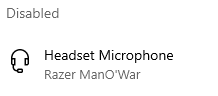
This fix has worked for me and I haven't had the 2000% volume issue anymore. Hopefully it will help someone. I will note that I'm not sure if this is the sole fix for this issue, as I did all the other suggested things in this thread aswell, so it may be a combination of things.
0 -

Same headset, same problem. However I also experience this with Microsoft Teams. I think this triggers with any software that seperates regular volume and chat volume through Synapse
0 -
I went to the 'Voice & Video' settings and then where it says 'Audio Subsystem' I changed that to Legacy from standard, and that fixed the issue for me.
0 -

Same problem on my side. I am using Razer Kraken Chroma 7.1 and this that helped me solve temporarily are:
- If i am in a voice chat with a friend, they leave the voice and join again, it solves it
- Leaving channels/group chat/ joining over and over again, sometimes fixes it
- Restarting discord works sometimes
- Unplugging the headset (they are USB for me) and connecting ti again solves it
I tried reinstalling it several times, restarting and many more other things but it keeps coming back. I tried few things that are written in comments, I will see if it works or not. If I find solution in mean time I will let you all know! I didn't have this issue before, but after some update it started happening and frankly it is annoying, hopefully this will be fixed soon because my ears almost bled few times how loud it can get and I didn't expect it XD Good luck you all!
0 -

I may have finally found the solution! (I believe people with Razer Man O War headsets and razer synapse 2.0 are experiencing this frustrating issue).
1. Right click the discord application
2. Click "Troubleshoot Compatability"
3. Click the first option "Try recommended settings"
4. It should then apply the update "Windows compatabiltity mode: Windows 8"
5. Test the program and click Next.
6. Finally click "Yes, save these settings for this program" and close the troubleshooter.
7. Launch discord and hopefully see the magic!
<3
5 -

@Deja
Oh my god. THANK YOU SO MUCH. I've been dealing with this stupid problem for almost half a year now.
Finally a working solution, thank you!
0 -
I'm back in contact with Razer staff, this time a forum support member. They suggested that I create a new Windows user and test if that makes a difference.
Funnily enough it did! I only did my testing with Apex Legends where I experience the issue most often, but this I imagine this translates to Discord as well. Do your own testing and let us know.
This breakthrough suggests that we all have some sort of software conflict in our main admin users that doesn't present itself in new non-admin users. The problem now is discovering where this conflict is occurring, I personally cannot think of anything I have installed on my admin user that may cause interference with Synapse drivers.
0 -

Deja Thank you so much from the bottom of my eardrums.
Your solution worked a treat.
Cheers :)
0 -

I solved my problem... Buying a new headset from another brand.
I got tired of the lack of support from Razer in this problem, and my headset was already quite old (almost 4 years of use).
It was good while it lasted.1 -

Same problem here, tried some of the solutions here, in the moment the Deja solution is working.
0 -
I'm glad to hear my method is working, although it's still not a permanent fix. I have realized that I have to use this method every time I start my pc, so I have disabled auto startup for discord and I manually have to do this method every time I start my PC. It's not that big of an issue, although I would hope razer or discord find a permanent fix so that this issue would be gone forever.
Please let me know if you guys experience the same issue, or has it worked permanently for youse after one try?
Diversis Flo Yagel
0 -
Dropping back to Windows 8 work for a while but then it started to fail so i dropped it back to windows 7 and it's been stable since :) Thanks for pointing me in the right direction in the first place. Again, thank you from the bottom of my ear durms :)
1 -
Flo oh okay, I might have to try that out. I am glad to hear your eardrums are now in good health and can rest easy now :) <3
0 -

 0
0 -
been dealing with this shit for months. just reinstalled windows. played for a week no issues. RAZER kraken 7.1 usb headset. installed synapse last night to change a setting on mouse and its doing it again. i think this confirms its and issue between synapse and windows or synapse and discord.
0 -
Hello guys, i was in contact with the discord support.
The answer i have about the problem is.
ATTENTION: i'm from Brazil, so my english isn't the best one, but i think it's "useful" post the answer here.
"Hello, Just to warn you that this problem with the volume of very high usage devices is already a known situation and is not on our team's radar. I want you to know that our team is working on a fix. However, I do not have an exact forecast as to when a solution will be available. I'm sorry that we don't have an immediate solution for you, but please let me know if you have any other questions and I'll be happy to help."
0 -
@Deja Everything went loud again yesterday. Realised that after an update for Discord i have to go to the shortcut and place compatibility back to windows 7. It will work till the next update then rinse and repeat.
I don't have Discord auto starting cos sometimes i want to be anti-social lol
Hope this helps
Flo :)
0 -
Ongoing as this is, now my mic sometimes doesn't want to work when I join a call so I have to keep leaving and rejoining until both work.
It's absolutely irritating that this is still an issue after all this time. I can never be the first to join calls anymore because it'll probably blast my ears as soon as someone joins so I have to tell others to join before me and repeatedly leave and join until it decides to stop happening. Neither Discord nor Razer have done a single thing about it and if not for my friends being against the idea I would have gone back to Skype, yes, it's that bad. It clearly has something to do with the Discord app because joining on the browser doesn't have this issue, but then the browser version is generally just too quiet and doesn't have all the same features.
Yes, I know it happens with other programs and uninstalling Synapse works so it's inherently a Razer problem, but something within Discord is making it so much more likely to happen because in other programs this basically never happens and in Discord I have a low chance of it actually working.
0
Please sign in to leave a comment.
Comments
122 comments