
Discord Orbs are virtual rewards that you can earn by completing Quests. Redeem them in the Shop for exciting perks like Nitro credits and Orbs-exclusive items.
What this article covers:
What are Discord Orbs?
Discord Orbs are rewards you earn by completing Quests. You can use them in the Shop to get Nitro credits, items from the main collections, and more. It’s an easy way to unlock Discord upgrades, no payment method required.
How do I earn Discord Orbs?
Desktop/Browser
1. To start earning Orbs, accept a Quest that offers them as a reward. You can do this in several ways on the desktop app and browser client:
-
Through the Quest Bar
- You will occasionally see the Quest bar pop up in the bottom-left of the app when you're eligible for a Quest. Hover over it to learn more about the Quest details and get started.
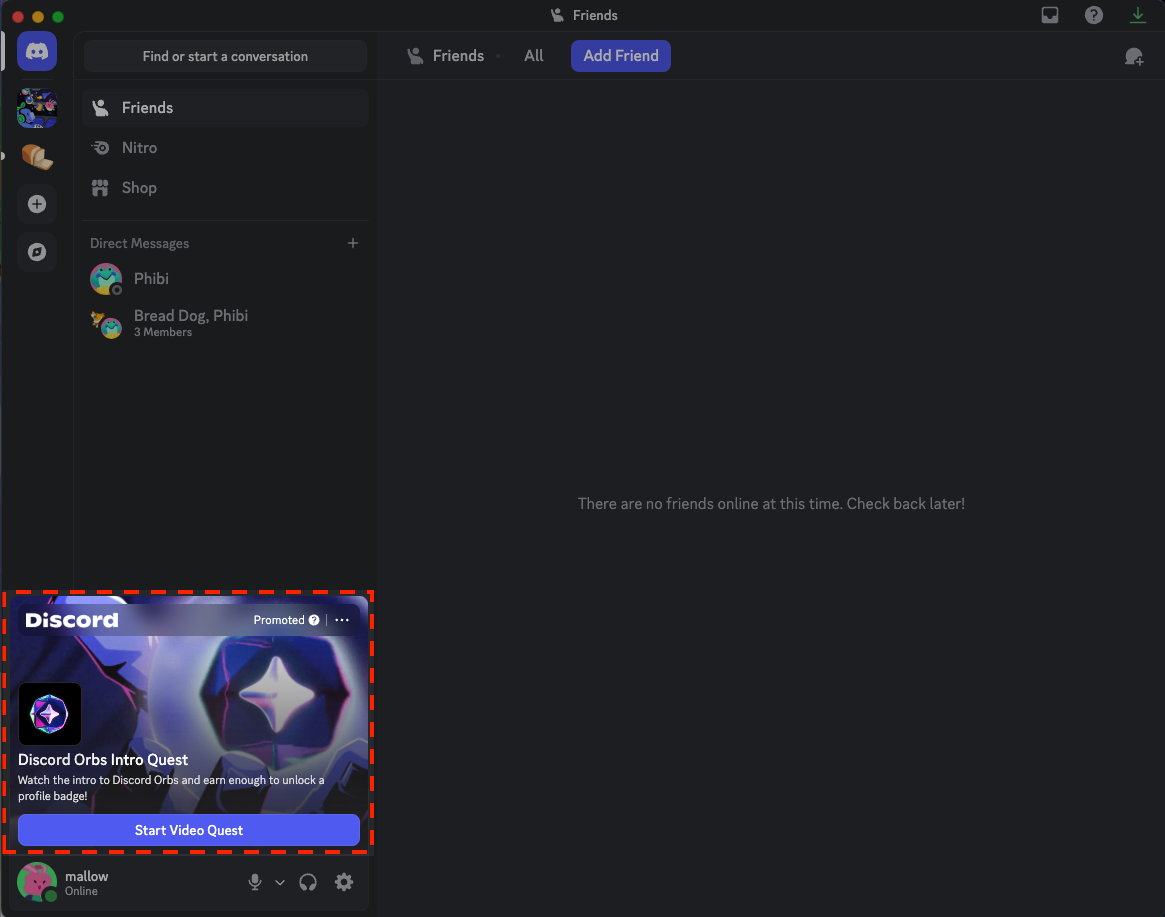
Quest Bar in Discord Desktop App
- Through Quest Home (Discover > Quests)
Navigating to Quest Home through Discover Tab
2. Complete the Quest and claim your Orbs reward.
Example of Claiming Discord Orbs from a Quest
3. You can check your Orbs balance in the top-right corner of Quest Home and Shop.
Orbs Balance
Mobile
1. On mobile, accept a Quest that offers Orbs as a reward. You can find eligible Quests by tapping your avatar > Settings > Quests, or by tapping your avatar > Orbs Balance.
Navigating to Settings > Quest Home (Left) or Tap Orbs Balance in Your Profile (Right) to find Quests
2. Complete the Quest and claim your Orbs reward.
Example of Claiming Discord Orbs from a Quest
Discord Orbs Multiplier for Nitro Members
For eligible Nitro subscribers, you can claim bonus Orbs through Quests! When you complete a Quest with Orb rewards as a Nitro subscriber, your Orb rewards have a 1.2x multiplier applied. The Orbs Multiplier perk is currently available for Quests starting May 8, 2026 that have Orbs as the reward.
Discord Orbs Multiplier detail in a Discord Quest with Orbs rewards
Eligibility Requirements:
- This perk is available to Nitro subscribers, including those on trial or gifted Nitro subscriptions.
- This perk is not available to Nitro subscribers through Nitro Credits or Nitro Basic.
Earning Orbs Through Orb Challenges
Orb Challenges give you another way to earn Orbs beyond completing Quests. Each Orb Challenge rewards you with Orbs for taking a specific action on Discord. New Orb Challenges may be added over time, and each one shows what you need to do to complete it.
You can view and track your Orb Challenges from three places on desktop or browser:
- Quest Home
Orb Challenges in Quest Home
- The Shop
Orb Challenges in the Shop
- Your Profile: select your avatar, then hover over or select the Orbs menu item in the account pop-out
Orbs Menu Item in the Account Pop-out
Eligibility Requirements:
- Each Orb Challenge shows what you need to do to complete it and how many Orbs you'll earn.
- Available Orb Challenges may vary between users and can change over time.
- Some Orb Challenges are only available for a limited time, and some can only be completed once.
- Purchases made with Orbs don't count toward Orb Challenges that involve a purchase. Only purchases made with a payment method are eligible.
Spending Your Discord Orbs
Where can I spend Orbs?
Head to the Shop tab to begin spending your Discord Orbs!
Desktop/Browser
1. Navigate to your Direct Messages list by selecting the Discord app icon in the upper-left corner.
Discord App Icon
2. Then, press the Shop tab [] to the right of your server list to enter the Shop.
Shop Tab
3. In the Shop, select the Orbs Exclusives tab at the top to view Orbs-exclusive items.
Orbs Exclusives Tab in the Shop
Mobile
1. On mobile, tap your avatar to navigate to your Profile.
2. Tap the Shop icon [] in the upper-right corner.
3. In the Shop, tap the Shop Menu icon [] in the upper-right corner, then select Orbs Exclusives.
Navigate to the Shop to Find Orb Exclusive Items
What can I buy with Orbs?
Here’s what you can purchase with Orbs in the Shop:
- Shop items from the main collections
- Orbs-exclusives: Nitro credits, a profile badge, special Avatar Decoration, and special Profile Effect.
You cannot purchase these items with Orbs:
- Gifts
- Partner-branded Shop items
- Recurring Nitro or Boosting subscriptions
How to Spend Orbs
Desktop/Browser
1. On desktop or browser, browse Orbs-exclusive items in the Orbs Exclusives tab of the Shop, or check the Shop All tab to see the full collection of items that can be claimed with Orbs.
2. Each item will display whether you can claim with Orbs or spend money to make your purchase. Select an item to view both pricing options.
3. To make a purchase, select your desired item and press Claim in the Shop window.
Orbs Exclusives Shop Items
Tip: To switch from Orbs to regular payment during purchase confirmation, exit and select the Buy button instead.
Buy Option in Shop Window
Mobile
1. To browse Orb Exclusive items on mobile, tap the Shop Menu icon [] in the upper-right corner of the Shop page, then select Orbs Exclusives.
2. To make a purchase using your Orbs, select the item, tap Redeem, then tap Redeem using Orbs to confirm.
Purchasing an Orbs Exclusive Shop Item on Mobile
Important Discord Orbs Information
- Switch between earning and spending Orbs by selecting the buttons in the Shop banner (Orbs Exclusives tab, Quest Home or through your Orbs balance).
- Orbs can only be used within Discord–they cannot be converted to real money.
- Earned Orbs do not expire once earned, and they remain in your account until you spend them.
- Orbs are attached to your account and cannot be shared or transferred between users.
Frequently Asked Questions
This FAQ is divided into sections:
- General Orbs Information
- Earning and Obtaining Orbs
- Spending Orbs
- Sharing and Transferring Orbs
- Support and Issues
General Orbs Information
Q: Will my Orbs expire?
A: Your Orbs stay in your account until you decide to spend them. However, as we continue monitoring how users earn and spend Orbs we might make future adjustments to keep the experience balanced for everyone. Additionally, keep in mind that if you lose access to your Discord account for any reason, including violating our Terms of Service or Community Guidelines, you may lose access to any Orbs associated with that account.
Q: What happens to my Orbs if my account is compromised or banned?
A: If you lose access to your Discord account for any reason, including violating our Terms of Service or Community Guidelines, you may lose access to any Orbs associated with that account. For cases involving compromised accounts or fraudulent purchases, please contact our support team for assistance.
Earning and Obtaining Orbs
Q: Can I buy or gift Orbs to someone?
A: No, you cannot gift or buy Orbs.
Q: Is there any other way to obtain Orbs? Can I only earn Orbs from Quests?
A: Orbs are primarily earned through Quests, with additional opportunities available through select promotional offers, subject to eligibility.
Q: What should I do if I see someone selling Orbs?
A: Please report any attempts to sell or trade Orbs, as this violates the Discord Orbs Terms and may result in account penalties.
Q: Why am I seeing more Orbs in my account than expected?
A: Some users who link their Discord and Riot Games (VALORANT or League of Legends) accounts or their Battle.net accounts may receive an Orbs reward. If you recently connected these accounts, that's likely the reason for the change.
Q: What are Orb Challenges?
A: Orb Challenges are a way to earn Orbs for completing specific actions on Discord, separate from Quests. You can view and track your Orb Challenges from Quest Home, the Shop, or your profile on desktop or browser.
Spending Orbs
Q: I noticed I can’t buy a specific Shop item. Why not?
A: You can spend Orbs on most Shop items, including Orbs-exclusive items. However, partner branded Shop items cannot be purchased with Orbs.
Q: Can I refund something I claimed in the Shop with Orbs?
A: Any items you claim in the Shop with Orbs are not refundable.
Q: If I claim Nitro credits using Orbs, will it apply to my account right away?
A: It depends on if you have an active subscription. See our Help Center article for more information on how Nitro credits work.
Sharing and Transferring Orbs
Q: Can I share or trade my Orbs with friends?
A: No, Orbs are tied to your personal Discord account and cannot be transferred between users.
Q: Can I exchange my Orbs for real money or transfer them to other platforms?
A: No, you cannot convert Orbs to real money or transfer them to other platforms.
Q: What happens to my Orbs if I change accounts?
A: Orbs remain tied to the original account where they were earned. They cannot be transferred between accounts, even if both accounts belong to you.
Support and Issues
Q: I'm experiencing issues with Discord Orbs. What should I do?
A: Contact Discord Support directly for assistance with any Orbs-related concerns.