
Keep the conversations that matter most right at your fingertips. With Favorites, Nitro users can add your most-used channels and DMs into a single, dedicated space. Whether it's a text channel or direct message you check constantly, Favorites puts everything important in one easy-to-reach place.
What this article covers:
What are Favorites?
Favorites is a feature that places all your top channels and DMs in a place that’s easy to find. Any channel or direct message you mark as a favorite will appear in a dedicated Favorites section at the top of your server list, keeping your most important conversations separate from the rest.
You can favorite channels from any server you're in, as well as DMs and group DMs — making Favorites a handy home base for everything you actually use on a regular basis. Plus, you can group these chats into custom categories to keep everything neat and tidy.
How to Favorite a Channel or DM
You can favorite text channels, direct messages (DMs), group direct messages (GDMs), forum channels, and voice channels. While you can’t favorite specific threads, you can favorite the text channel a thread is in.
1. Navigate to the channel or DM/GDM that you want to favorite.
2. Right-click on what you would like to favorite and then select Add to Favorite. If you have a Category set up, you can add the item to your preferred category instead.
Adding a text channel to Favorites
How to Remove a Channel or DM from Favorites
1. Navigate to your Favorites by selecting the Favorites icon [] in the top-left corner above your server list.
2. Right-click on a channel or DM/GDM and select Remove from Favorites.
Removing a text channel from your Favorites
How to Create a Category for your Favorites
To organize your Favorites even more, you can create a variety of Categories. Uncategorized channels will appear at the top of your favorited items.
1. While under the Favorites tab right-click and select Create Category.
2. Name your Category and then press Create Category.
3. Now when you add a channel or DM/GDM to your Favorites, you can add them into a category instead or drag your current favorites items to the category.
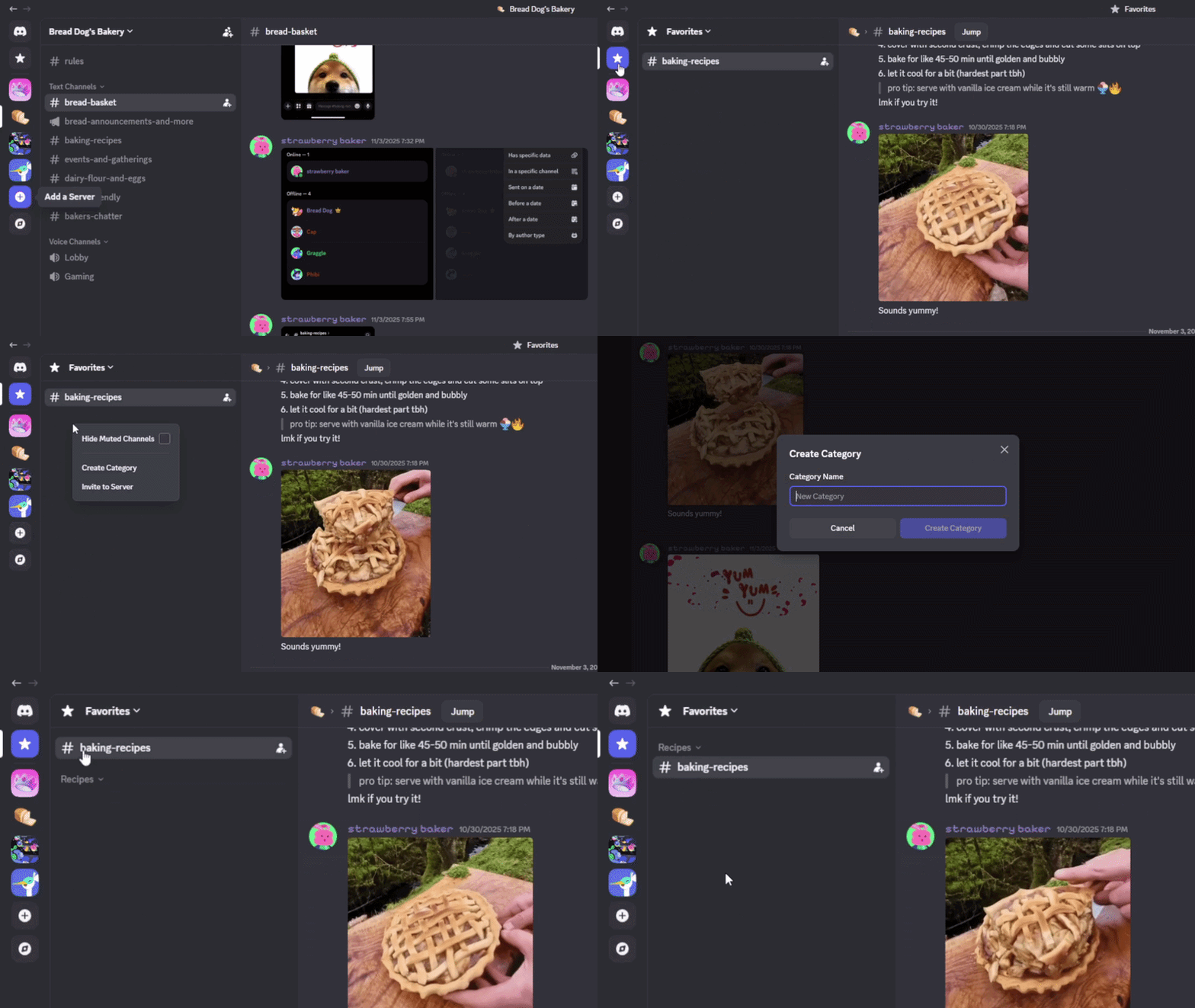 Create a Category for Favorites
How to View your Favorites
To view everything in your Favorites select the Favorite icon [] in the top-left corner above your server list on desktop, browser, or mobile.
Favorites icon
Frequently Asked Questions
Q: What all can I add to my Favorites?
A: Text channels, voice channels, DMs, GDMs, and forum channels. Only threads can not be favorited.
Q: Does favoriting a channel notify anyone?
A: No, it's personal and private.
Q: Is there a limit to how many items I can favorite?
A: You can add up to 200 items to your Favorites. This includes any Categories you create.
Q: Can I reorder my Favorites?
A: Yes, you can move a favorited channel or DM, or organize them in a category.
Q: Are Favorites available on mobile?
A: Yes, Favorites is available on desktop, browser, and mobile. However, you can only edit Favorites from desktop/browser.
Q: Can I preview Favorites if I don't have Nitro?
A: Yes! You can preview the Favorites feature in settings even without a Nitro subscription. And if you are a past subscriber and re-subscribe, your Favorites are saved. For Nitro users, Favorites are saved even if you toggle the feature off — so when you turn it back on, everything will reappear exactly as you last set it up.
Q: Can I turn off Favorites from displaying?
A: Yes, if you are a Nitro user you can go to User Settings > Chat and enable or disable the Show Favorites Server toggle. Your Favorite will be saved even if you toggle it off or unsubscribe and re-subscribe to Nitro.